Welcome to Netris Sandbox
Netris sandbox is a ready-to-use environment for testing Netris automatic NetOps. We have pre-created some example services for you. Feel free to view, edit, delete, and create new services. Reach out to us if you have any questions. https://netris.ai/slack
The credentials should be in the email response to your sandbox request.
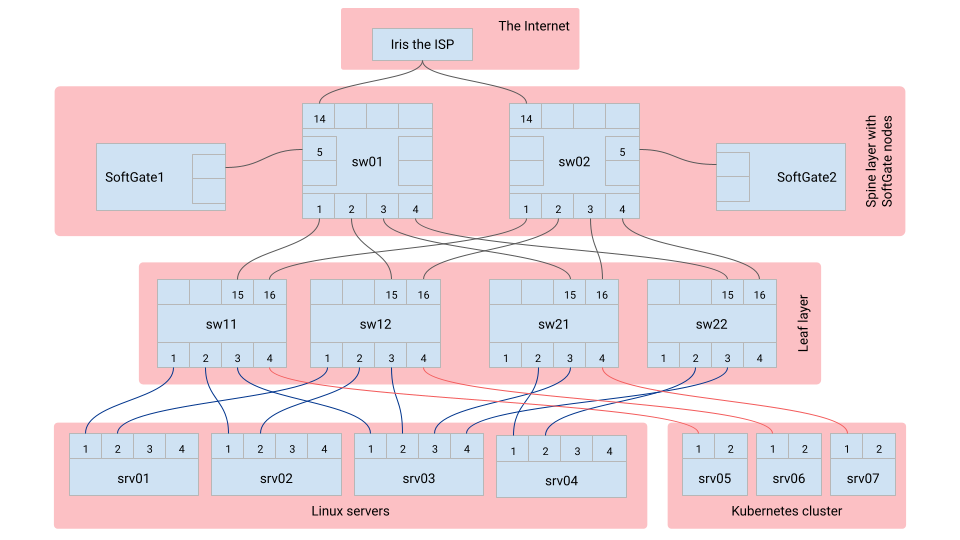
This environment includes:
Netris Controller: A cloud-hosted Netris controller, loaded with examples.
Switching fabric: Two spine switches and four leaf switches, all Netris-operated.
SoftGate: Two SoftGate gateway nodes for border routing, L4 Load Balancing, site-to-site VPN, and NAT. Both Netris-operated.
Linux servers: Four Linux servers, with root access where you can run any applications for your tests.
Kubernetes cluster: A 3 node Kubernetes cluster, integrated with Netris controller, feel free to deploy any applications for your tests.
ISP: Internet upstream, providing the sandbox Internet connectivity with real-world routable public IP addresses.
Topology diagram
Netris GUI
Linux servers
- Example Netris services pre-configured:
srv01, srv02, srv03 - are consuming a ROH (Routing On Host) Netris example service, see Services–>ROH. srv01, srv02 - are behing Anycast L3 load balancer. srv04 - is consuming a V-NET (routed VXLAN) Netris example service, see Services–>V-NET.
Accessing Linux servers:
srv01: ssh [email protected] -p 23061
srv02: ssh [email protected] -p 23062
srv03: ssh [email protected] -p 23063
srv04: ssh [email protected] -p 23064
Kubernetes cluster
This sandbox provides an up and running Kubernetes cluster. You can deploy any application that needs to expose a TCP port, or you can deploy your favorite ingress controller that needs to expose it’s TCP port. Netris will process type:load-balancer automatically using it’s L4 Load Balancer service.
To access built-in Kubernetes cluster navigate to Services–>Kubenet in Netris GUI. You’ll find a pre-configured example Kubenet service. Kubenet is a network service purpose built for serving to Kubernetes nodes. Edit the service and copy “Kubeconfig” content from the example service into your “.kube/config” on your local machine. Now you should be able to kubectl the sandbox cluster.
Upstream ISP
This sandbox provides an upstream ISP service with real-world Internet routing. There is one pre-configured example NET–>E-BGP service, which is advertising the public IP subnet to the upstream ISP Iris.
ISP settings:
Customer subnet: 50.117.59.208/28

(pre-configured example)
Vlan: 801
IP customer: 50.117.59.122/30
IP Iris: 50.117.59.121/30

Vlan: 802
IP customer:  50.117.59.126/30
IP Iris: 50.117.59.125/30
Networks used
Management subnet: 10.254.45.0/24
Loopback subnet:   10.254.46.0/24
Example subnet:    192.168.45.0/24
Customer subnet:   192.168.46.0/24
Public subnet:     50.117.59.208/28