
 Join Slack
NVIDIA NMX-C (NVLink) Integration Plugin for Netris Controller
Overview
The Netris NVLink plugin provides an integration between your Netris Controller and NVIDIA NMX Controller (NMX-C) for AI infrastructures that include NVIDIA NVLink Multi-Node NVL72 fabrics. Netris already acts as your Ethernet fabric manager and, with this NVLink integration, allows you to continue using Netris as your one source of truth for all your data center networking intent, including your East-West, North-South, Out-of-Band management, and scale-up (NVL72) networking fabrics. See the “How an AI network differs from a traditional network” section of Introduction to Netris for more details about different network fabrics in a typical AI data center.
Key Benefits
Unified Management Interface: Define tenant isolation intent by simply listing servers in a Server Cluster object. Netris implements your declared intent in all appropriate Netris-managed fabrics, including Ethernet, InfiniBand, DPUs, and NVL72.
Automated Provisioning: Automatically configure NVLink partitions on NVL72 Multi-Node fabrics to align with tenant boundaries configured on other fabrics such as East-West (via Ethernet or InfiniBand) and North-South Ethernet. No additional actions are required to be taken outside of Netris to partition the NVL72 domain, making Netris your one-stop shop for declaring your multi-tenancy intent across all Netris-managed networking fabrics.
Simplified Operations: The Server Cluster feature eliminates the need to manage NVL72 partitions and GPU UIDs separately, as well as switch ports, VLANs, VRFs on Ethernet, and GUIDs, PKeys, SHARP groups on InfiniBand.
Architecture
The Netris NVLink plugin acts as the integration layer between Netris Controller and NVIDIA NMX controllers (NMX-C):
Netris Controller: Orchestrates the Ethernet switches and provides the primary user interface for all your network automation, abstraction, and multi-tenancy actions.
NVIDIA NMX Controller (NMX-C): Manages the NVLink Multi-Node fabric switches and provides specialized NVLink functionality, such as hardware lifecycle management.
Netris NVLink Plugin: Synchronizes multi-tenancy configurations between both systems.
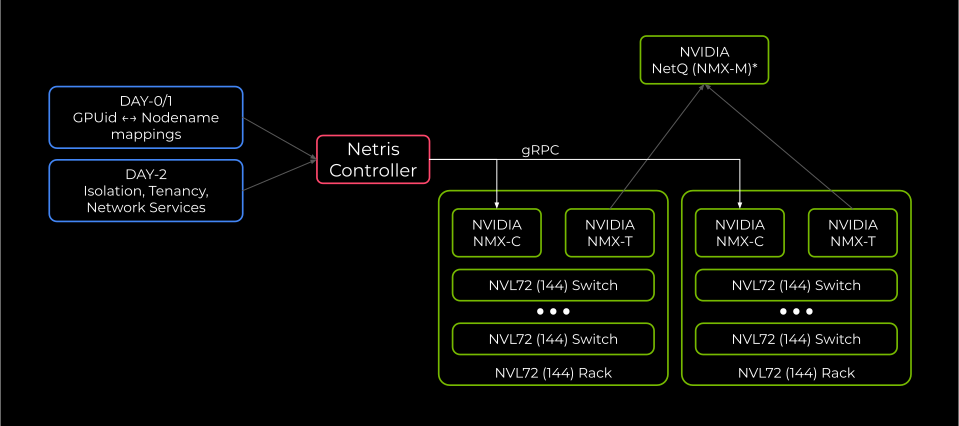
Figure: Netris NVLink Integration architecture
Tip
NVIDIA NetQ (NMX-M) is not required by Netris, but it is recommended for granular Network + GPU telemetry.
When you define a Server Cluster in Netris, the plugin automatically:
Discovers GPU UIDs for each server using the preloaded GPU ledger (see the Loading GPU Inventory section below for more details).
Creates and manages appropriate NVL partitions in NMX-C.
Assigns appropriate GPU UIDs to appropriate NVL partitions.
The Netris NVLink plugin runs continuously and, by default, validates that the operator’s intent is correctly applied every 10 seconds. If the NVLink partition doesn’t match the intent declared in the Netris Controller, the Netris NVLink plugin will enforce the intent in the appropriate NMX controller (NMX-C).
The NMX controller (NMX-C) remains the source of truth for GPU assignment to NVLink partitions (see the Verification section below). The Netris Controller is the source of truth for the operator’s intent, and the Netris NVLink plugin will continuously enforce the operator’s intent as expressed through the Server Cluster object in the Netris Controller.
NVL72 is a rack-scale system, and a typical data center deployment will have multiple NMX controllers (NMX-Cs) — one per rack (see NVIDIA materials for more information on NVL72). Netris will automatically discover which NMX controllers (NMX-Cs) must create the NVL72 partition and will only create partitions in the appropriate NMX controllers.
High-Level Workflow
Install and configure the Netris NVLink plugin.
Preload GPU mapping.
The Netris NVLink plugin automatically discovers the current state from defined NMX-C(s).
Netris determines the desired partition based on the Server Cluster Template and Server Cluster membership.
The Netris NVLink plugin reconciles every 10 seconds.
Tip
Server Cluster is the only supported way for Netris to manage NVLink partitions.
Tip
Netris creates, modifies, and destroys NVL72 partitions, and adds or removes GPU UIDs from them. All other NVLink related activities, such as NVLink switch life cycle management, are performed by NMX-C and/or other relevant NVIDIA solutions. NVIDIA NMX-C is the NVLink fabric manager.
Version Compatibility
Component |
Minimum Version |
|---|---|
Netris Controller |
4.6.0+ |
Netris NVLink Plugin |
Bundled with Netris Controller |
NVIDIA NMX-C |
Consult your NVIDIA representative for supported versions |
Tip
The Netris NVLink plugin communicates with NMX-C using its gRPC API with TLS client certificate authentication. Ensure your NMX-C version supports gRPC API access.
Prerequisites
Before installing the Netris NVLink plugin, ensure there is:
A functioning Netris Controller environment. See Netris Controller Installation documentation for more details.
Network connectivity between the Netris Controller and the NVIDIA NMX controller (NMX-C).
Credentials for the Netris Controller.
A GPU UID inventory file (CSV) mapping each server hostname to its GPU UIDs, ready to be loaded via
nvlink-loader(see the Loading GPU Inventory section below for CSV format details).mTLS client certificate(s), private key(s), and the root CA certificate for authenticating NMX controllers (NMX-Cs).
Netris NVLink Plugin Installation
Installing the Netris NVLink plugin
The Netris NVLink plugin ships with the Netris Controller, but requires the additional steps outlined below to initialize. In the rest of the steps below, the guide assumes you unpacked the tarball into ~/netris-controller-ha/ (see Installing HA Netris Controller in Air-Gapped Environments for more details).
Tip
Perform all steps in this section from the primary Netris Controller node only; they do not need to be repeated on standby nodes.
Step 1: Configuring the NMX-C plugin credentials
Provide the controller credentials that the Netris NVLink plugin will use to communicate with the Netris Controller by editing and applying the netris-controller-ha/manifests/netris-controller/nvlink/secret.yaml file.
~$ vi ./netris-controller-ha/manifests/netris-controller/nvlink/secret.yaml
apiVersion: v1
kind: Secret
metadata:
  name: netris-controller-nvlink-agent-envs
  namespace: netris-controller
type: Opaque
stringData:
  NETRIS_CONTROLLER_ADDR: http://netris-controller-ha-web-service-backend.netris-controller
  NETRIS_CONTROLLER_LOGIN: "netris"
  NETRIS_CONTROLLER_PASSWORD: "Password!"
  NETRIS_SITE_NAME: "Site"
  # NETRIS_VERIFY_SSL: "true"
In the secret.yaml file you should only need to update the values of the NETRIS_CONTROLLER_LOGIN, NETRIS_CONTROLLER_PASSWORD, and NETRIS_SITE_NAME variables. The value of NETRIS_SITE_NAME must match the Site name defined in the Netris controller. See Netris Site for more details on creating a Site in Netris.
Warning
Do not modify the value of the NETRIS_CONTROLLER_ADDR variable.
Apply the updated secret.yaml
~$ kubectl apply -f ./netris-controller-ha/manifests/netris-controller/nvlink/secret.yaml
Tip
The username and password supplied in the secret.yaml must have “Permit All” selected as the value of the “Permission Group” field, “All Tenants” added, and Edit selected when adding a Netris user.
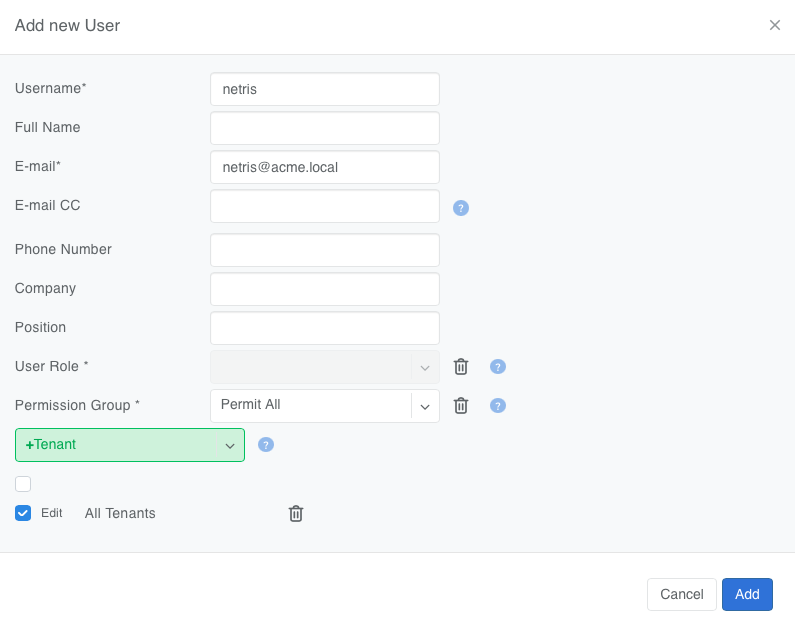
Figure: Adding a Netris user with the Permission Group set to Permit All and All Tenants selected
Tip
If you update the credentials, please repeat Step 1 of this installation guide and restart the deployment.
kubectl rollout restart deployment/netris-controller-nvlink-agent -n netris-controller
Step 2: Configuring NMX Controller connection
Edit the ./netris-controller-ha/manifests/netris-controller/nvlink/config.yaml file and provide the IP addresses of all the NMX Controllers (NMX-Cs) in scope, as well as the NMX-C PKI certificate bundle, i.e., the file names for the Signed Certificate, Private Key, and the Root CA Certificate.
~$ vi ./netris-controller-ha/manifests/netris-controller/nvlink/config.yaml
apiVersion: v1
kind: ConfigMap
metadata:
  name: netris-controller-nvlink-agent-config
  namespace: netris-controller
data:
  config: |-
    nmx-config:
      verify-ssl: true
      cert-file: /etc/netris-nvlink-agent/tls/client.crt
      key-file: /etc/netris-nvlink-agent/tls/client.key
      root-ca: /etc/netris-nvlink-agent/tls/rootCA.crt
      common-name: nmxc.example.com
      nmx-c:
        nmxc_001:
          addresses:
            - 192.0.2.1:8601
        nmxc_002:
          addresses:
            - 192.0.2.2:8601
        nmxc_003:
          addresses:
            - 192.0.2.3:8601
        nmxc_004:
          addresses:
            - 192.0.2.4:8601
        nmxc_005:
          addresses:
            - 192.0.2.5:8601
        nmxc_006:
          addresses:
            - 192.0.2.6:8601
Tip
The /etc/netris-nvlink-agent/tls/ path is the path to the file inside the container, and not on the host system. It should match the value of the mountPath key in the deploy.yaml file.
Depending on your NMX-C configuration, you may provide one shared PKI certificate bundle for all NMX Controllers, as shown above, or specify a unique certificate bundle per NMX-C as shown below.
apiVersion: v1
kind: ConfigMap
metadata:
  name: netris-controller-nvlink-agent-config
  namespace: netris-controller
data:
  config: |-
    nmx-config:
      verify-ssl: true
      root-ca: /etc/netris-nvlink-agent/tls/rootCA.crt
      nmx-c:
        nmxc_001:
          cert-file: /etc/netris-nvlink-agent/tls/nmx01/client.crt
          key-file: /etc/netris-nvlink-agent/tls/nmx01/client.key
          common-name: nmxc001.example.com
          addresses:
            - 192.0.2.1:8601
        nmxc_002:
          cert-file: /etc/netris-nvlink-agent/tls/nmx02/client.crt
          key-file: /etc/netris-nvlink-agent/tls/nmx02/client.key
          common-name: nmxc002.example.com
          addresses:
            - 192.0.2.2:8601
        nmxc_003:
          cert-file: /etc/netris-nvlink-agent/tls/nmx03/client.crt
          key-file: /etc/netris-nvlink-agent/tls/nmx03/client.key
          common-name: nmxc003.example.com
          addresses:
            - 192.0.2.3:8601
Netris NVLink Plugin Configuration Parameters
The following configuration options are available in the Netris NVLink plugin YAML configuration file:
nmx-config - top-level mapping for the plugin configuration
verify-ssl - key to signal the plugin whether to use TLS authentication when accessing the NMX controller (NMX-C)
cert-file - absolute path to the client certificate
key-file - absolute path to the private key of the client certificate
root-ca - absolute path to the root CA certificate file.
common-name - must match the value of the CN field of the certificate presented by the NMX controller (NMX-C).
nmx-c - contains a mapping describing each NMX controller (NMX-C) you’d like Netris to create NVLink partitions in. It must contain at least one key with a value of a list of hostnames and port numbers
addresses - IP address and port number of each NMX-C endpoint.
Each NMX-C must be presented through a separate key.
Apply the configuration to your Kubernetes cluster:
~$ kubectl apply -f ./netris-controller-ha/manifests/netris-controller/nvlink/config.yaml
Load the PKI certificate bundle into the K8S secrets (the example command below assumes the relevant PKI files are located in current directory):
~$ kubectl -n netris-controller create secret generic netris-controller-nvlink-agent-tls \
  --from-file=client.key=./client.key \
  --from-file=client.crt=./client.crt \
  --from-file=rootCA.crt=./rootCA.crt
If your deployment requires a unique client certificate per NMX-C, you will need to create multiple K8S secrets as shown below:
~$ kubectl -n netris-controller create secret generic netris-controller-nvlink-agent-tls-nmx01 \
  --from-file=client.key=./nmx01/client.key \
  --from-file=client.crt=./nmx01/client.crt \
  --from-file=rootCA.crt=./rootCA.crt
~$ kubectl -n netris-controller create secret generic netris-controller-nvlink-agent-tls-nmx02 \
  --from-file=client.key=./nmx02/client.key \
  --from-file=client.crt=./nmx02/client.crt \
  --from-file=rootCA.crt=./rootCA.crt
~$ kubectl -n netris-controller create secret generic netris-controller-nvlink-agent-tls-nmx03 \
  --from-file=client.key=./nmx03/client.key \
  --from-file=client.crt=./nmx03/client.crt \
  --from-file=rootCA.crt=./rootCA.crt
Step 3: Applying the K8S deployment
If you are using a unique certificate bundle per NMX-C, you will need to edit ./netris-controller-ha/manifests/netris-controller/nvlink/deploy.yaml before using it to include all the volume mounts and secrets you have created earlier. Otherwise, no changes to deploy.yaml are necessary.
The example below shows the per-NMX-C-certificate variant of the deploy.yaml file.
apiVersion: apps/v1
kind: Deployment
metadata:
  name: netris-controller-nvlink-agent
  namespace: netris-controller
spec:
  replicas: 1
  selector:
    matchLabels:
      app: netris-controller-nvlink-agent
  template:
    metadata:
      labels:
        app: netris-controller-nvlink-agent
    spec:
      containers:
      - name: nvlink-agent
        image: netrisai/bare-metal-nvlink-agent:4.6.1-001
        command: ["/app/servicebin", "-c", "/app/config.yaml"]
        envFrom:
        - secretRef:
            name: netris-controller-nvlink-agent-envs
        env:
        - name: NETRIS_TIMEOUT
          value: "10"
        - name: RECONCILE_INTERVAL
          value: "10"
        volumeMounts:
        - name: nvlink-tls-nmxc01
          mountPath: /etc/netris-nvlink-agent/tls/nmxc01
          readOnly: true
        - name: nvlink-tls-nmxc02
          mountPath: /etc/netris-nvlink-agent/tls/nmxc02
          readOnly: true
        - name: nvlink-tls-nmxc03
          mountPath: /etc/netris-nvlink-agent/tls/nmxc03
          readOnly: true
        - name: nvlink-config
          mountPath: /app/config.yaml
          subPath: config
          readOnly: true
      volumes:
        - name: nvlink-tls-nmxc01
          secret:
            secretName: netris-controller-nvlink-agent-tls-nmx01
            defaultMode: 0400
        - name: nvlink-tls-nmxc02
          secret:
            secretName: netris-controller-nvlink-agent-tls-nmx02
            defaultMode: 0400
        - name: nvlink-tls-nmxc03
          secret:
            secretName: netris-controller-nvlink-agent-tls-nmx03
            defaultMode: 0400
        - name: nvlink-config
          configMap:
            name: netris-controller-nvlink-agent-config
Apply the deployment
~$ kubectl apply -f ./netris-controller-ha/manifests/netris-controller/nvlink/deploy.yaml
Loading GPU Inventory
You must preload the mapping between the GPU UIDs and the servers in which those GPUs are installed before the automatic NVL partition management can start.
Here is an example of the GPU UID inventory file:
hostname,gpuUid
hgx-pod00-su0-h00,875835130816197840
hgx-pod00-su0-h00,961186615343340613
hgx-pod00-su0-h00,796824814706104730
hgx-pod00-su0-h00,684212070855729123
hgx-pod00-su0-h01,718625720642846212
hgx-pod00-su0-h01,788578661925003442
hgx-pod00-su0-h01,910329783472956766
hgx-pod00-su0-h01,814561743235261831
hgx-pod00-su0-h02,996615732638596030
hgx-pod00-su0-h02,884228998345288014
hgx-pod00-su0-h02,730725932032980822
hgx-pod00-su0-h02,749618463645136824
hgx-pod00-su0-h03,893225768947662203
hgx-pod00-su0-h03,825286183620844317
hgx-pod00-su0-h03,784007583961668668
hgx-pod00-su0-h03,713366763878128965
Tip
In this file, the hostname refers to the server’s object name in Netris Inventory.
Step 1: Install the nvlink-loader
The nvlink-loader binary ships as part of the Netris Controller distribution package. Copy the nvlink-loader.bin binary into the Netris controller’s local /usr/local/bin and make it executable.
~$ sudo cp ./netris-controller-ha/files/k3s/nvlink-loader.bin /usr/local/bin/nvlink-loader && sudo chmod +x /usr/local/bin/nvlink-loader
Step 2: Load the GPU inventory into the Netris Controller
Warning
You only need to load the inventory on the primary Netris controller node. Do not repeat this action on standby controller nodes.
Execute nvlink-loader script to import the GPU UID inventory into the Netris Controller
~$ nvlink-loader --csv-file gpu-mapping.csv --netris-url "https://controller.acme.com" --username "admin" --password "passw0rd"
Where
--csv-file <filename>    specifies the comma-separated value (CSV) file with GPU UID inventory

--netris-url "<URL>"     specifies the Netris Controller URL

--username "<username>"  specifies the Netris administrator username

--password "<password>"  specifies the Netris administrator password
Upon successful import, you should see output similar to the one below
INFO [0000] Found 72 GPU mappings in CSV file
INFO [0000] Logging in to Netris…
INFO [0000] Successfully logged in to Netris
INFO [0000] Fetching inventory from Netris (import mode)...
INFO [0001] Found 38 server inventory items
INFO [0002] Successfully updated server 'hgx-pod00-su0-h00' with 4 GPU mappings
INFO [0003] Successfully updated server 'hgx-pod00-su0-h01' with 4 GPU mappings
INFO [0004] Successfully updated server 'hgx-pod00-su0-h02' with 4 GPU mappings
<output truncated for brevity>
Step 3: Verify the imported GPU inventory
You can also confirm successful import by examining the appropriate server objects in the Netris controller. In the Custom JSON field of each relevant server object in Netris Inventory, you should see a JSON object similar to the following
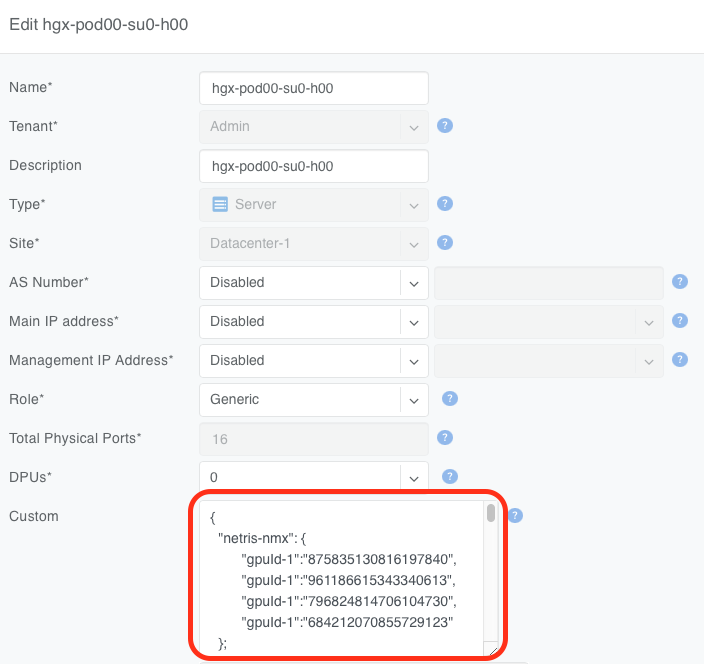
Figure: GPU UID mapping shown in the server's Custom JSON field
Using the Netris NVLink plugin
After successfully configuring the Netris NVLink plugin and loading the GPU inventory, as shown above, you can use the Server Cluster functionality to create, update, and delete NVL72 NVLink partitions.
Tip
You must update your Server Cluster Template to include NVLink integration. See the Server Cluster documentation for more details.
Tip
In the most basic sense, when you create a Server Cluster using a Server Cluster Template with NVLink integration, as shown in the Server Cluster documentation, Netris will look up the relevant GPU UIDs in the Netris Inventory for each server object included in the given Server Cluster and create one NVL72 partition per NMX-C named after the Server Cluster, including the Server Cluster ID. Then Netris will assign the appropriate GPU UIDs to that partition.
Warning
Netris does not enforce the completeness of the GPU inventory or the correctness of the server-to-GPU ID mapping. Please verify the content of your inventory CSV file before loading it into the Netris Controller.
Warning
NVIDIA does not support NVL72 partitions spanning more than one NVL domain. If your Server Cluster spans multiple NVL72 domains, each NVL72 domain will have a partition created within it with GPU UIDs from that domain only. Please reach out to Netris support or your NVIDIA representative with questions about operating multiple NVL72 domains.
Verification
When you need to directly validate NVL72 partitions and their membership, Netris recommends using a script to simplify access to NMX-C.
Here is an example of that script.
#!/bin/bash

# NMX-C Partition Info Script
# Usage: ./nmx-get-partitions.sh [gateway_id]

# Configuration
GATEWAY_ID="${1:-gateway_id}"
NMX_HOST="nmxc-01.acme.com:8601"
CERT_PATH="/home/ubuntu/netris-nvlink-agent/client.crt"
KEY_PATH="/home/ubuntu/netris-nvlink-agent/client.key"
CACERT_PATH="/home/ubuntu/netris-nvlink-agent/rootCA.crt"

echo "=== NMX-C Partition Information ==="
echo "Gateway ID: $GATEWAY_ID"
echo "Host: $NMX_HOST"
echo "====================================="
echo

# Get partition info from NMX-C
grpcurl -d "{\"gatewayId\": \"$GATEWAY_ID\"}" \
  -cert "$CERT_PATH" \
  -key "$KEY_PATH" \
  -cacert "$CACERT_PATH" \
  "$NMX_HOST" \
  nmx_c.NMX_Controller.GetPartitionInfoList | \
jq -r '
  .partitionInfoList[] |
  "Partition ID: \(.partitionId.partitionId)",
  "Name: \(.name // "N/A")",
  "Number of GPUs: \(.numGpus // "N/A")",
  "GPU UIDs:",
  (if .gpuUidList then (.gpuUidList[] | "  - \(.)") else "  - None" end),
  "Health: \(.health // "N/A")",
  "Type: \(.partitionType // "N/A")",
  "----------------------------------------"
'
Below are a few examples of running this verification script.
The following output shows that only a default partition is present in the NMX controller (NMX-C) and no GPU UIDs are assigned to it.
~$ ./nmx-get-partitions.sh
=== NMX-C Partition Information ===
Gateway ID: gateway_id
Host: nmxc-01.acme.com:8601
===================================

Partition ID: 32766
Name: Default Partition
Number of GPUs: N/A
GPU UIDs:
- None
Health: NMX_PARTITION_HEALTH_HEALTHY
Type: NMX_PARTITION_TYPE_GPUUID_BASED
The customer may choose to configure each NVL72 domain with a default partition (see NVIDIA NVLink Multi-Node Documentation for more details). Netris is fully compatible with this scenario and will remove the GPU UIDs from the default NVL72 partition prior to assigning them to a new tenant partition.
The output below shows a new NVL72 partition created with 8 GPUs after a Server Cluster was instantiated containing servers with those GPU UIDs. Note that the partition name contains the Server Cluster ID (192 in this example), which may be helpful during troubleshooting. Netris will always include the Server Cluster ID in the NVL72 partition name.
~$ ./nmx-get-partitions.sh
=== NMX-C Partition Information ===
Gateway ID: gateway_id
Host: nmxc-01.acme.com:8601
===================================

Partition ID: 32766
Name: Default Partition
Number of GPUs: N/A
GPU UIDs:
- None
Health: NMX_PARTITION_HEALTH_HEALTHY
Type: NMX_PARTITION_TYPE_GPUUID_BASED
-----------------------------------
Partition ID: 8593
Name: netris-cluster-192
Number of GPUs: 8
GPU UIDs:
- 875835130816197840
- 961186615343340613
- 796824814706104730
- 684212070855729123
- 718625720642846212
- 788578661925003442
- 910329783472956766
- 814561743235261831
Health: NMX_PARTITION_HEALTH_HEALTHY
Type: N/A
-----------------------------------
Maintenance and Deprovisioning
If you need to perform maintenance on one or more GPU servers that are part of an NVL72 partition, Netris recommends that you remove those servers from the Server Cluster before performing this maintenance. Doing so will remove the relevant GPU UIDs from the tenant’s NVL72 partition.
Warning
Removing a server from a Server Cluster will also remove this server from every and all V-Nets and VPCs that this server was a member of as a result of being a member of a Server Cluster. Netris will not remove this server from any V-Nets where the switch ports connected to this server were assigned to this V-Net manually or using labels.