
 Join Slack
Access Control Lists (ACL)
Netris supports ACL-based network access control on managed switch fabrics. Each entry you configure — an ACL entry — matches traffic by source and destination IP address, port or port range, and protocol, and applies a Permit or Deny action.
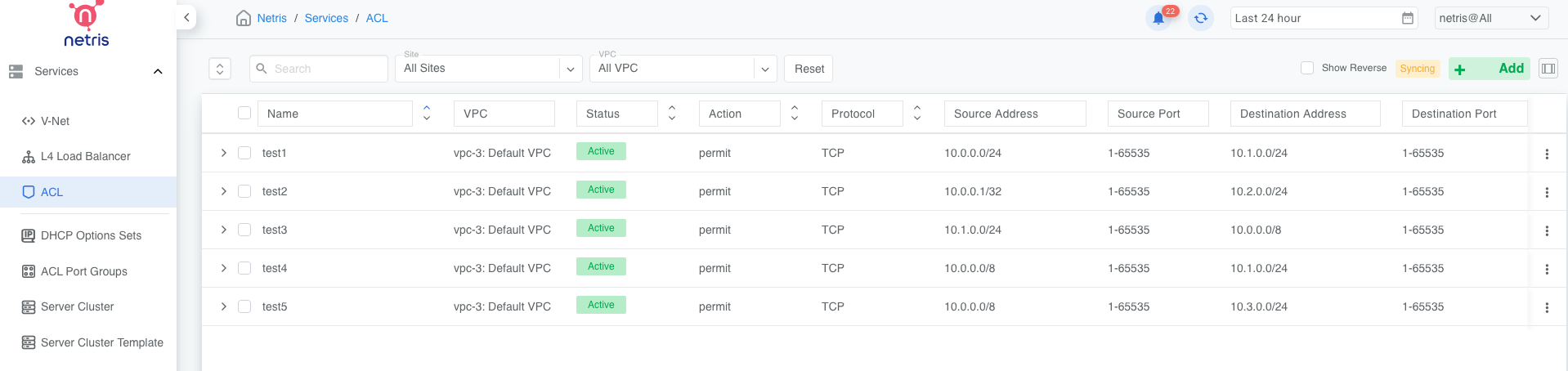
Figure: Netris ACL main view
ACL entries execute in switch hardware or on SoftGate depending on the source and destination values (see “Where ACL Entries Are Installed”), providing line-rate performance for security enforcement.
There’s no fixed limit on the number of ACL entries you can create in the Netris Controller, because Netris only installs any given ACL entry on the switches where it’s actually needed. However, the number of ACL entries that can be installed on any single switch is limited by that switch’s TCAM capacity.
You can review the usage metrics of any Netris-managed switch in the Inventory screen.

Figure: TCAM utilization view under Net→Inventory
Where ACL Entries Are Installed
The Netris algorithm automatically determines where in the fabric any given ACL entry is installed and, therefore, enforced, based on whether the source or destination values resolve outside the selected VPC.
If either the source or destination network is outside the selected VPC, the ACL entry will be added to SoftGate’s output chain.
If both source and destination networks resolve to the selected VPC, the ACL entry will be installed on an SVI (Switch Virtual Interface) closest to the source of the matching traffic.
Netris fully supports using overlapping IP schemas in different VPCs. Because every SVI (a Layer-3 interface) belongs to exactly one VPC, two VPCs with overlapping or identical IP ranges never conflict, even if both have sources on the same physical switch: the route lookup happens in the VPC selected on the ACL entry, and the resulting entry always lands on an L3 interface belonging to that VPC.
ACL Default Policy
The ACL default policy is to permit all hosts to communicate with each other. You can change the default policy on a per-site basis by editing the Site features under Net→Sites. Once the “ACL Default Policy” is changed to “Deny,” the specified site will start dropping traffic unless specific communication is permitted by an ACL entry.
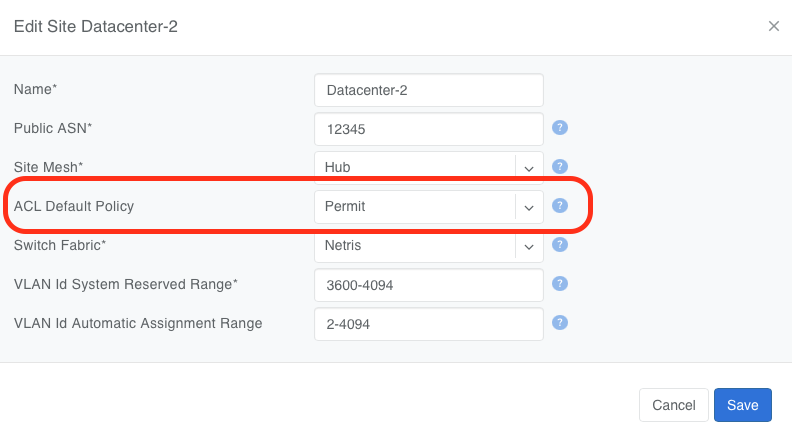
Figure: Changing the ACL Default Policy for a site
ACL Entries / Rules
ACL entries can be created, listed, and edited under Services→ACL. IPv4 and IPv6 addresses can’t be mixed in the same entry — each ACL entry matches a single address family.
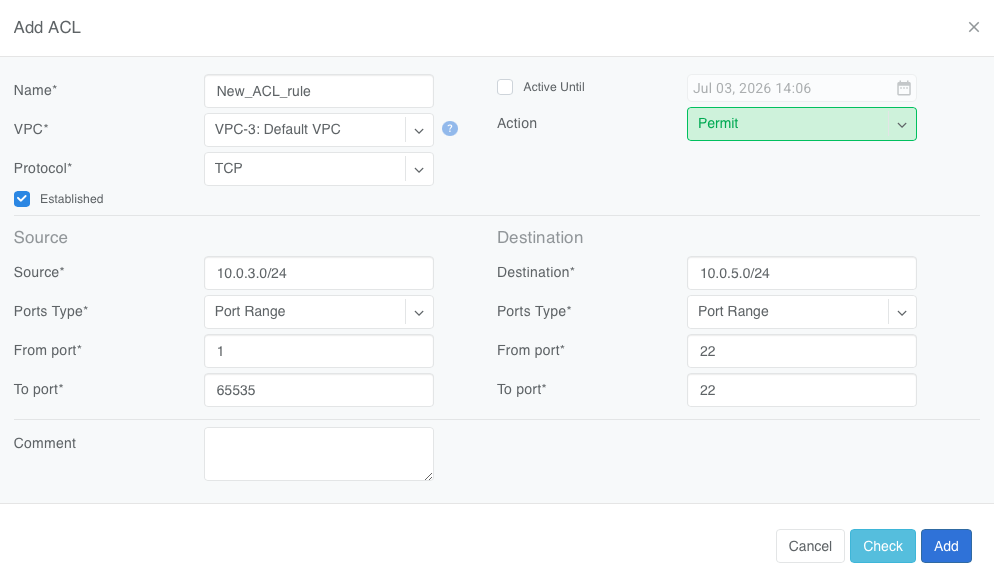
Figure: Example ACL rule permitting SSH traffic with Established
Description of ACL entry fields.
Name - Unique name for the ACL entry.
VPC - The VPC this ACL entry applies to. Netris uses this value to determine where to install the ACL entry. See “Where ACL Entries Are Installed” section.
Protocol - IP protocol to match.
All - Any IP protocol.
IP - Specific IP protocol number.
TCP - TCP.
UDP - UDP.
ICMP ALL - Any IPv4 ICMP protocol.
ICMP Custom - Custom IPv4 ICMP type. See “ICMP Custom values” below.
ICMPv6 ALL - Any IPv6 ICMP protocol.
ICMPv6 Custom - Custom IPv6 ICMP code.
Active Until - Disable this rule at the defined date/time.
Action - Permit or Deny forwarding of matched packets.
Established - For TCP, match reverse packets except with TCP SYN flag. For non-TCP, generate a reverse rule with the source/destination swapped.
ICMP Custom values (Protocol = ICMP Custom) - each value sets the ACL entry to match one ICMPv4 type. Several of these are deprecated and unlikely to appear in real traffic, but Netris still lets you match on them.
Value |
ICMP Type |
Meaning |
|---|---|---|
Echo Reply |
0 |
Reply to an Echo (ping) request. |
Unassigned |
1 |
Reserved by IANA; no defined meaning. |
Unassigned |
2 |
Reserved by IANA; no defined meaning. |
Destination Unreachable |
3 |
The destination network, host, protocol, or port couldn’t be reached (also covers conditions like “fragmentation needed”). |
Source Quench |
4 |
Deprecated congestion-control message that once asked a sender to slow down. |
Redirect |
5 |
A router tells a host to use a different next hop for a destination. |
Alternate Host Address |
6 |
Deprecated; identified an alternate address for the destination host. |
Unassigned |
7 |
Reserved by IANA; no defined meaning. |
Echo |
8 |
Echo (ping) request. |
Router Advertisement |
9 |
Part of ICMP Router Discovery; a router periodically announces itself. |
Router Selection |
10 |
Part of ICMP Router Discovery; a host requests an immediate router advertisement at startup. |
Time Exceeded |
11 |
Sent when a packet’s TTL expires in transit (e.g. traceroute) or a fragment reassembly times out. |
Parameter Problem |
12 |
Sent when a router or host finds a problem with an IP header field. |
Timestamp |
13 |
Requests a timestamp exchange for basic clock sync/latency measurement. |
Timestamp Reply |
14 |
Reply to a Timestamp request. |
Information Request |
15 |
Deprecated; let a host learn its network number. |
Information Reply |
16 |
Reply to an Information Request. |
Address Mask Request |
17 |
Deprecated; a host asks for its subnet mask. |
Address Mask Reply |
18 |
Reply to an Address Mask Request. |
Traceroute |
30 |
Deprecated ICMP-based traceroute mechanism. |
Datagram Conversion Error |
31 |
Deprecated; reported errors converting a datagram between protocols (e.g. IP-to-X.25 gateways). |
Mobile Host Redirect |
32 |
Deprecated mobile-IP redirect message. |
IPv6 Where-Are-You |
33 |
Deprecated host-discovery message. Despite the name, this is an ICMPv4 type, unrelated to IPv6. |
IPv6 I-Am-Here |
34 |
Deprecated; the paired reply to “IPv6 Where-Are-You.” |
Mobile Registration Request |
35 |
Deprecated mobile-IP registration message. |
Mobile Registration Reply |
36 |
Reply to a Mobile Registration Request. |
Domain Name Request |
37 |
Deprecated; let a host ask for its own domain name. |
Domain Name Reply |
38 |
Reply to a Domain Name Request. |
Photuris |
40 |
Signals a security failure during a Photuris key-management exchange. |
Source/Destination - Source and destination addresses and ports to match.
Source IPv4/IPv6 - IPv4/IPv6 address.
Ports Type
Port Range - Match on the port or a port range defined in this window.
Port Group - Match on a group of ports defined under Services→ACL Port Group.
From Port - Port range starting from.
To Port - Port range ending with.
Comment - Descriptive comment.
Warning
At least one of Source or Destination must fall within an existing IPAM entry of type Subnet (not Allocation) — Netris uses this to confirm the ACL entry is anchored to your deployment. The address doesn’t have to match a Subnet entry exactly; it just needs to fit entirely within one; for example, source 10.0.0.1/32 is valid as long as an IPAM Subnet of 10.0.0.0/24 (or any Subnet-type entry that contains it) exists, even though 10.0.0.1/32 itself was never entered into IPAM. If neither Source nor Destination fits within a known Subnet, Netris rejects the ACL entry with “Both Source and Destination addresses are out of this deployment.”
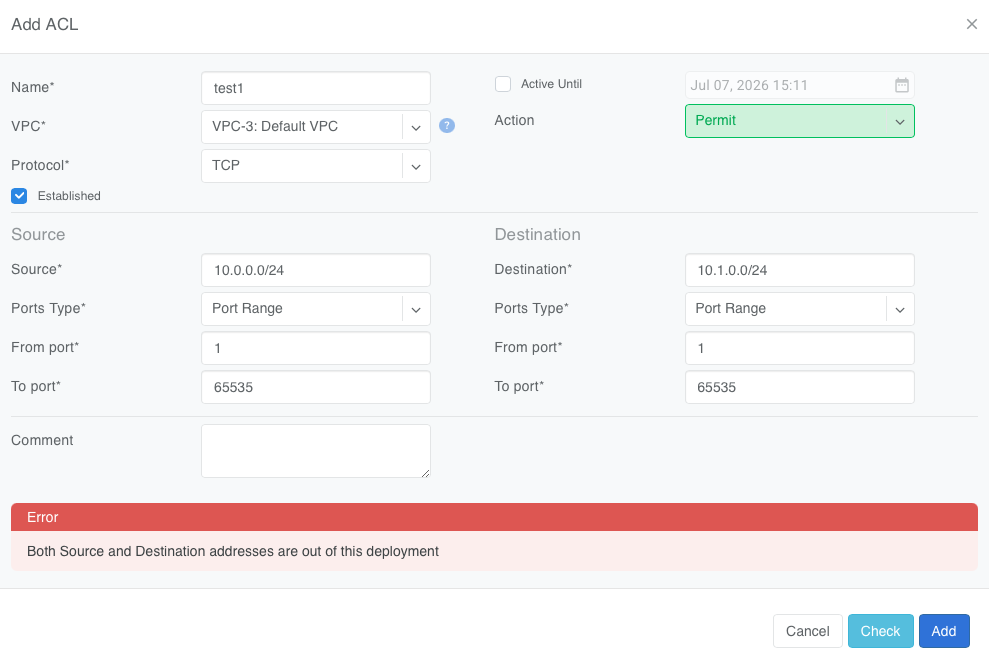
Figure: Rejecting an ACL entry that will never be installed on any switch
Checking for overlapping rules
Netris can show you whether the ACL entry you are creating will overlap with another already existing entry. The Check button checks the ACL entry you’re adding, editing, or copying against existing ACL entries, and flags any existing entry whose matched traffic overlaps with it — whether that entry is fully shadowed by (entirely contained within) the candidate, or only partially overlaps with it.
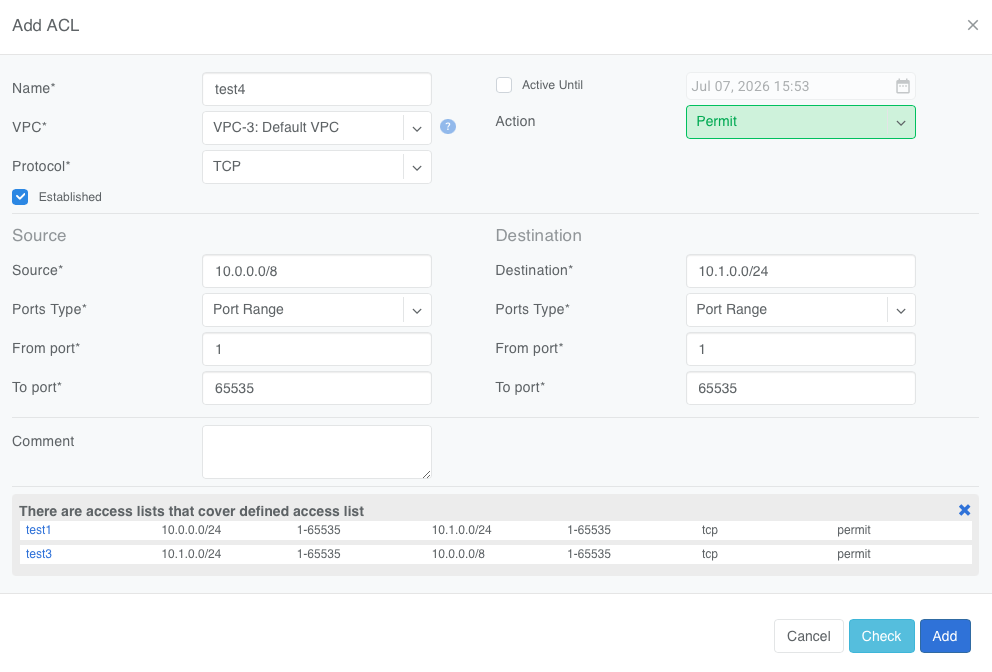
Figure: Check button indicates other rules with partial match to the candidate ACL entry
Example: Checking a candidate ACL entry for TCP from 10.0.0.0/8 to 10.1.0.0/24 surfaces two existing ACL entries: TCP from 10.0.0.0/24 to 10.1.0.0/24 (fully shadowed — that traffic is entirely contained within the candidate’s), and TCP from 10.1.0.0/24 to 10.0.0.0/8 (a partial match — since 10.1.0.0/24 is a subset of 10.0.0.0/8, any traffic from 10.1.0.0/24 to 10.1.0.0/24 satisfies both rules’ address ranges, even though neither rule is a superset of the other).
ACL Processing Order
From Services→ACL, every entry you create lives in one flat list. Netris installs entries on a per-interface basis (see “Where ACL Entries Are Installed”): for each interface, it identifies the entries that apply and then sorts that subset independently. That sorted position becomes the entry’s literal sequence number in the switch or SoftGate’s installed rule table, so this order is what determines match precedence on the device. Within each interface’s subset, entries are sorted as follows:
Sort by source IPv4/IPv6 prefix, longest to shortest.
For rules with the same source prefix, sort by destination prefix, longest to shortest.
For rules with the same source and destination prefix, sort by protocol, in the order: ICMP, UDP, TCP, ANYTHING_ELSE, IP.
For rules with the same source prefix, destination prefix, and protocol, sort by source port range, smallest to largest.
For rules with the same source prefix, destination prefix, protocol, and source port range, sort by destination port range, smallest to largest.
Action isn’t itself part of the sort order: a more specific Permit rule can take effect ahead of a broader Deny rule and vice versa. This gives more specific rules precedence over general ones, similar to longest-prefix-match behavior in routing.
A rule with “Established” enabled generates a second, independent rule with source and destination swapped. That reverse rule is sorted into the list by the same criteria above, and — because installation location is based on a route lookup on each rule’s own source address (see “Where ACL Entries Are Installed”) — it’s often installed on a different switch, or SoftGate, than its forward rule, each one taking its own independent position in that interface’s sorted list.
After all the entries relevant to a given interface, Netris appends an explicit rule that matches the site’s ACL Default Policy: deny ip any any if the policy is Deny, or permit ip any any if the policy is Permit.
Because a single ACL entry is always one address family or the other (see above), this sort order never has to resolve precedence between IPv4 and IPv6 entries.
ANYTHING_ELSE in the protocol order covers protocols that carry TCP flags; these flags aren’t directly configurable on a rule, but checking “Established” automatically sets the appropriate flags on the generated reverse rule. IP, by contrast, refers to selecting a specific IP protocol number in the Netris controller — choose “All” to match every protocol.