
 Join Slack
SoftGate HS
Overview
In multi-tenant environments, tenants typically require controlled ingress and egress connectivity to their VPCs—for example, workload access to and from the Internet.
SoftGate is an optional, multi-tenant (VPC-aware) software component designed for cloud providers and scales horizontally to provide this ingress and egress connectivity. The SoftGate software runs on a dedicated set of operator-provided bare-metal servers and is tightly integrated with the Netris-managed North-South fabric.
Services Provided by SoftGate
SoftGate provides the following network services on a per-tenant basis:
Source Network Address Translation (SNAT)
Enables tenant workloads to initiate outbound connections to external networks while preserving tenant isolation.
Destination Network Address Translation (DNAT)
Enables inbound connections from external networks to reach tenant workloads. DNAT includes inbound port forwarding and 1:1 NAT, where traffic on all ports is forwarded unconditionally. The latter is functionally equivalent to an Elastic IP in AWS.
Layer-4 Load Balancing (L4LB)
Distributes inbound traffic across multiple backend endpoints within a tenant’s VPC. L4LB service includes support for backend health checks.
DHCP Server
Assigns IP addresses to workloads connected to tenant networks. Learn more about configuring the Netris DHCP service in the DHCP section of the Netris documentation.
What SoftGate does not do
SoftGate is intentionally scoped to provide Layer-4 ingress and egress services and does not provide the following capabilities:
Next-generation firewall (NGFW) functionality
SoftGate does not perform deep packet inspection, application-aware firewalling, or advanced security policy enforcement.
Application-layer load balancing
SoftGate provides Layer-4 load balancing only and does not offer TLS, Layer-7, or application-aware load balancing capabilities.
Hardware Requirements
A SoftGate HS active-active HA (highly available) cluster requires at least 4 nodes. Two SoftGates will forward stateful traffic (SNAT), and two others will forward stateless traffic (DNAT, 1:1 NAT, Layer-4 Load Balancing, etc.). Each group (stateful and stateless) can scale horizontally by deploying more servers as CPU & RAM utilization requires.
Component |
Required |
Recommended |
Comment |
|---|---|---|---|
CPU: x86_64 |
16 Cores |
32 Cores or more |
|
RAM: ECC |
128GB |
256GB or more |
|
NIC (dataplane) |
2x10Gbps |
2x25Gbps or faster |
Any NVIDIA ConnectX hardware is supported. |
NIC (management) |
1xGbps |
1x10Gbps or faster |
The management NIC is a separate, dedicated network card in addition to the built-in IPMI/iLO/BMC integrated interface. |
DISK |
300GB |
300GB or larger |
|
OS |
Ubuntu 24.04 LTS |
Ubuntu 24.04 LTS |
SoftGate software has been fully tested on Ubuntu 24.04 LTS. Contact the Netris sales team to inquire about support for other operating systems, such as RHEL. |
Performance
The Netris engineering team benchmarked SoftGate HS performance using a 64-byte packet size on Intel and AMD CPUs. The results represent the performance of a single SoftGate HS node in the General role. The SoftGate cluster’s cumulative performance depends on the number of deployed nodes and how traffic is distributed between them. See the High Availability and Load Distribution section of this document for more information on how traffic is distributed across SoftGate nodes.
1 Netris VPC
Cumulative number of Netris DNAT rules across all VPCs |
Throughput |
|---|---|
800 |
13 MPPS |
1300 |
12 MPPS |
1600 |
10 MPPS |
3333 |
8 MPPS |
16666 |
2 MPPS |
100 Netris VPCs
Cumulative number of Netris DNAT rules across all VPCs |
Throughput |
|---|---|
800 |
12 MPPS |
1300 |
11 MPPS |
1600 |
10 MPPS |
3333 |
7 MPPS |
16666 |
2 MPPS |
1000 Netris VPCs
Cumulative number of Netris DNAT rules across all VPCs |
Throughput |
|---|---|
800 |
9 MPPS |
1300 |
8 MPPS |
1600 |
8 MPPS |
3333 |
7 MPPS |
16666 |
2 MPPS |
1 Netris VPC
Cumulative number of Netris DNAT rules across all VPCs |
Throughput |
|---|---|
800 |
|
1300 |
|
1600 |
8 MPPS |
3333 |
|
16666 |
100 Netris VPCs
Cumulative number of Netris DNAT rules across all VPCs |
Throughput |
|---|---|
800 |
|
1300 |
|
1600 |
8 MPPS |
3333 |
|
16666 |
1000 Netris VPCs
Cumulative number of Netris DNAT rules across all VPCs |
Throughput |
|---|---|
800 |
|
1300 |
|
1600 |
8 MPPS |
3333 |
|
16666 |
Note
We will add additional performance data soon.
Architecture Overview
This section describes how SoftGate fits into a Netris-managed network, physically and logically, and how it provides horizontally scalable, Netris-VPC-aware, dynamically programmable IP address translation (NAT) and Layer-4 Load Balancing (L4LB) services to Netris VPCs.
SoftGate physical connectivity
Each SoftGate node must be physically connected to Netris-managed switches that are part of the North-South network fabric.
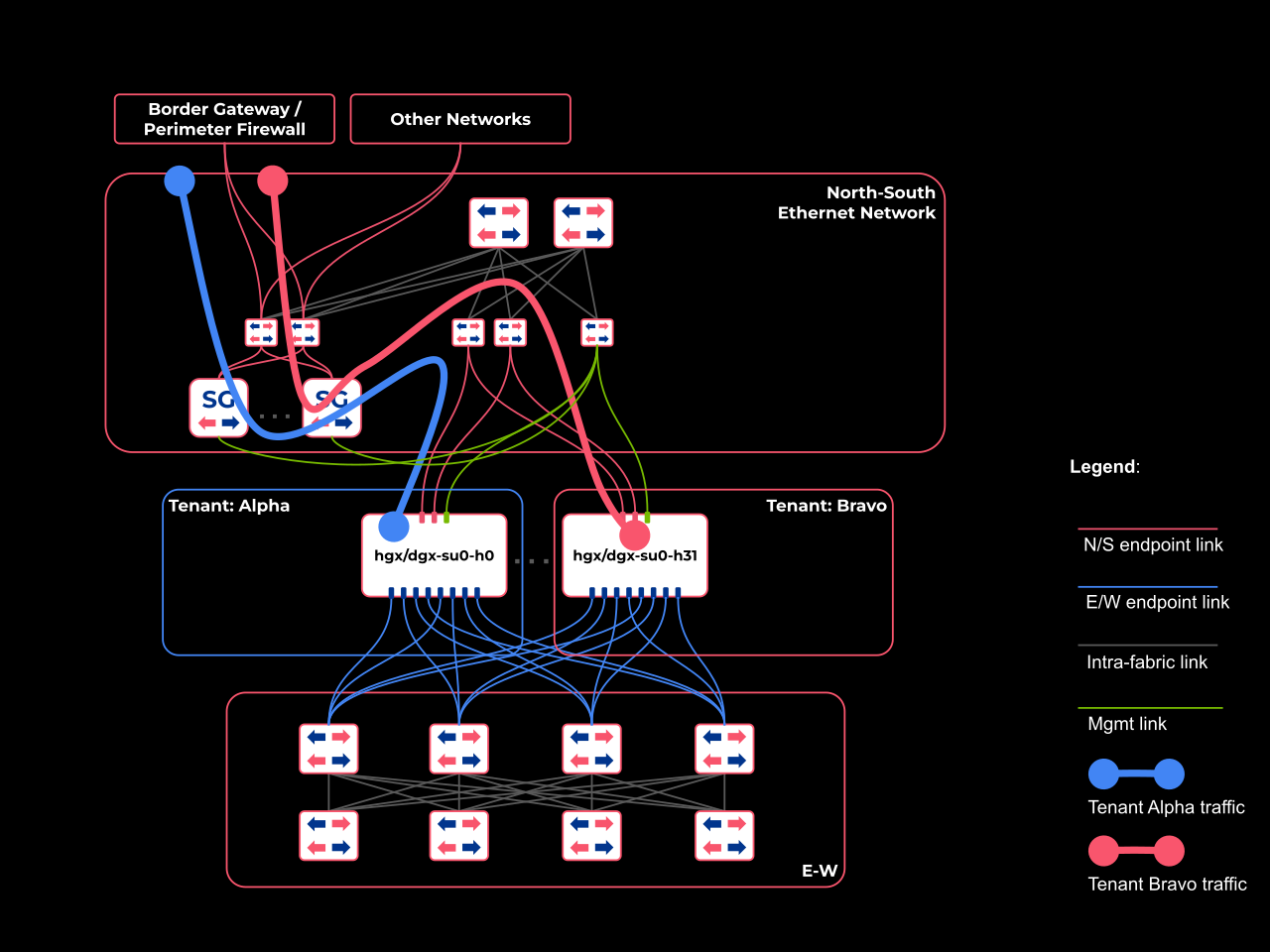
Netris recommends at least two physical dataplane connections (coral color in the diagram) and at least one management connection (green color in the diagram) per SoftGate node to provide link and device redundancy.
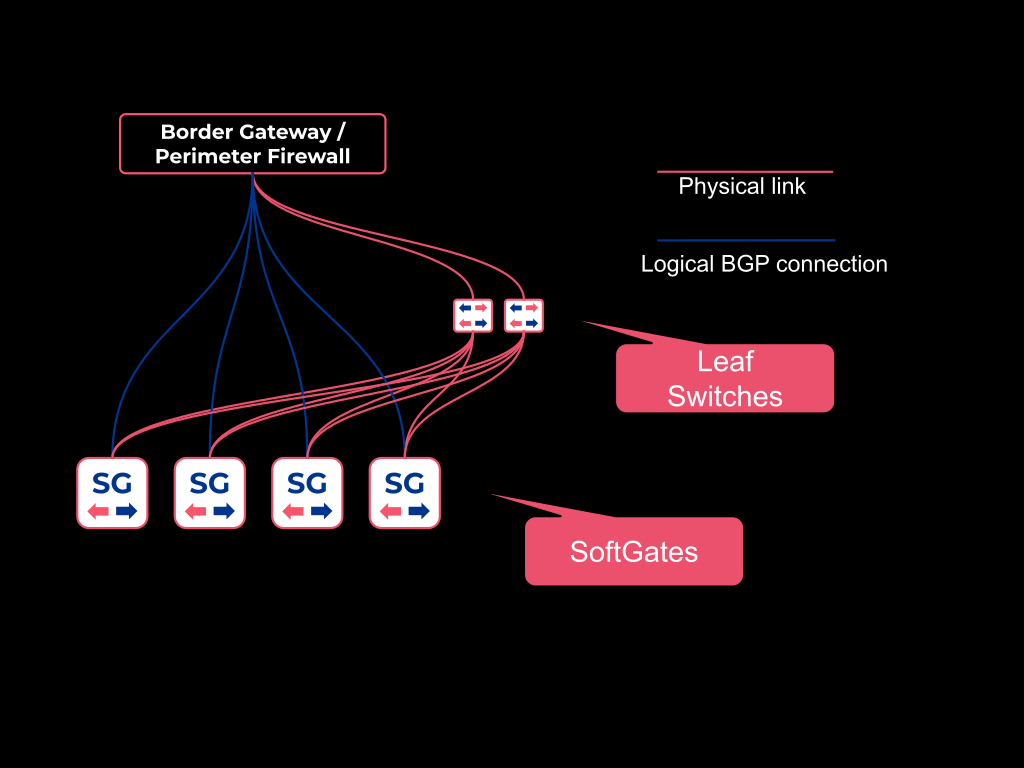
The upstream routers that form BGP sessions with SoftGate nodes (described in the SoftGate logical connectivity section) must also be physically connected to the Netris-managed fabric. Typically, the upstream routers connect to the same leaf switches as the SoftGate nodes; however, they can connect to any Netris-managed switch in the North-South fabric.
SoftGate logical connectivity
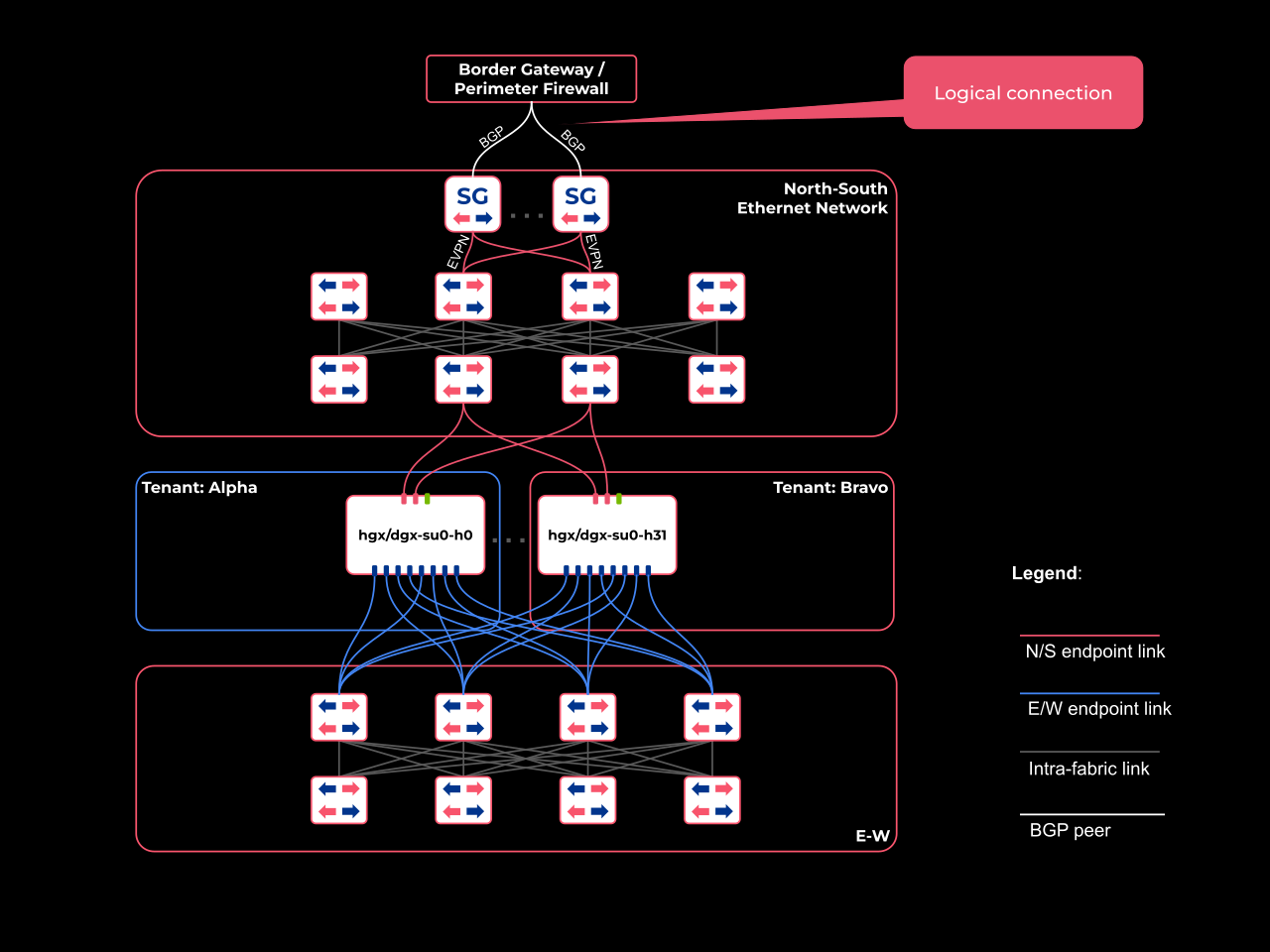
SoftGate is logically positioned at the edge of the Netris-managed North–South network.
Tip
SoftGate HS provides connectivity between the Internet and Netris VPCs (DNAT, SNAT, L4LB) at the edge of the North-South fabric. Additionally, the VPC Connect feature enables direct connectivity into a Netris VPC, such as private network interconnects or dedicated external routing.
SoftGate integrates directly with the Netris-managed North–South EVPN fabric by acting as a VTEP. The Netris SoftGate agent installed on each SoftGate node automatically configures the node to establish EVPN BGP peering relationships with the Netris-managed fabric, with no user input required. SoftGate nodes become VTEPs in the North-South EVPN/VXLAN fabric, which enables them to exchange traffic with any Netris VPC.
Each SoftGate node establishes a BGP peering relationship with every upstream router or firewall. These BGP peering relationships are established based on the relevant parameters you provide in the Netris controller. SoftGate uses these BGP relationships to
learn the default route and other IP prefixes that are advertised by these upstream routers.
advertise the relevant prefixes to the upstream routers, as configured by you in the Netris controller. See the BGP route exchange between SoftGates, upstream routers, and downstream switches section of this document for more information on this topic.
To provide reachability between the SoftGate nodes and the upstream routers through the EVPN/VXLAN North-South Netris-managed fabric,
Netris automatically configures a dedicated, VXLAN-based layer-2 tunnel between each switch port on the Netris-managed EVPN fabric where an upstream router is physically plugged in and each virtual port inside each SoftGate.
Netris SoftGate agent on each SoftGate node automatically configures a BFD-enabled BGP peering session with each upstream router, as configured in the Netris controller. You can learn more about configuring these BGP peering sessions in the Upstream/Border Routers (EBGP) section of this document.
SoftGate node Control Plane
SoftGate node control plane is implemented with the FRRouting software stack and is fully managed by the Netris controller.
The FRRouting software stack is automatically installed during the provisioning phase on each SoftGate node.
The Netris SoftGate agent automatically configures FRR to form BGP/EVPN peer relationships with the Netris-managed North-South fabric and becomes a VTEP in that fabric.
The Netris SoftGate agent also automatically configures FRR, based on parameters you define in the Netris controller, to establish BFD-enabled BGP peering relationships with the upstream routers.
Based on the EVPN and BGP information received from the fabric and the Netris controller, the Netris SoftGate agent automatically configures packet-forwarding rules in the Linux networking stack.
SoftGate node Data Plane
SoftGate dataplane is implemented using XDP (eXpress Data Path).
XDP is a high-performance, programmable framework in the Linux kernel that allows processing network packets at the earliest possible stage, directly from the network driver, before they hit the main network stack, using eBPF programs for tasks like filtering and load balancing with minimal overhead. It significantly boosts SoftGate throughput and efficiency by handling packets faster than traditional methods, enabling kernel bypass for high-speed data paths.
The Netris SoftGate agent automatically installs the relevant netfliter rules and attaches the appropriate interfaces on the SoftGate node to the XDP pipeline.
Warning
XDP requires the MTU not to exceed 3498 bytes. Netris automatically implements this requirement.
Warning
Disable hyperthreading for optimal performance.
In Netris 4.6.0, the SoftGate role General is XDP accelerated. SoftGate role SNAT XDP acceleration is coming soon.
SoftGate Roles and Flavors
A deployment requires at least 4 SoftGate nodes for high availability, and you can add more nodes for horizontal scalability. Each SoftGate is assigned one of two roles, which determine the type of traffic processing it performs:
Role: General
SoftGates with this role handle stateless services including DNAT (which includes both 1:1 NAT and inbound port forwarding) and Layer-4 load balancing (L4LB). General SoftGates also provide DHCP server services.
General SoftGates advertise specific /32 prefixes to upstream routers, allowing return traffic to be directed to the correct SoftGate node. For optimal operation, the upstream routers should be configured to accept /32 route advertisements from SoftGates.
Role: SNAT
SoftGates with this role perform the stateful SNAT function for Netris VPC-originated outbound traffic. SNAT, a purely outbound service, can translate the source IP of packets originated from one or more sources inside a Netris VPC. This configuration, in which multiple internal sources are translated behind a single global IP or a small pool of global IPs, is commonly called SNAT overload or Port Address Translation (PAT).
SNAT SoftGates advertise specific /32 routes to upstream routers, so return traffic is directed to the correct SoftGate node. For optimal operation, configure the upstream routers to accept /32 route advertisements from SoftGates.
Warning
Starting with Netris 4.6.0, SoftGate HS (HyperScale) is the recommended SoftGate flavor.
Installation and Initial Deployment
Prerequisites
A server with Ubuntu Linux 24.04 LTS.
Internet connectivity or an “air-gapped” installation package.
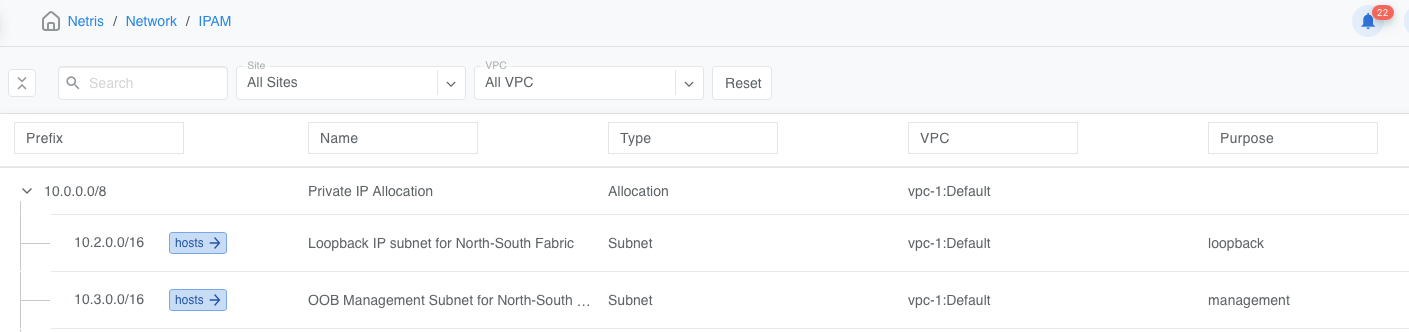
Subnets IPAM created in “vpc-1:Default”:
At least one subnet Purpose: Loopback
At least one subnet Purpose: Management
Installation Guide
To provision a Netris SoftGate node, you must execute two main steps:
Create the SoftGate node object in Network->Inventory, including defining its links.
Install the SoftGate software stack using the appropriate “one-liner” installer command.
Below are the step-by-step instructions.
Navigate to the Network->Inventory section and add a new hardware object with Type: SoftGate, Flavor: SoftGate HS. Select the desired SoftGate Role.
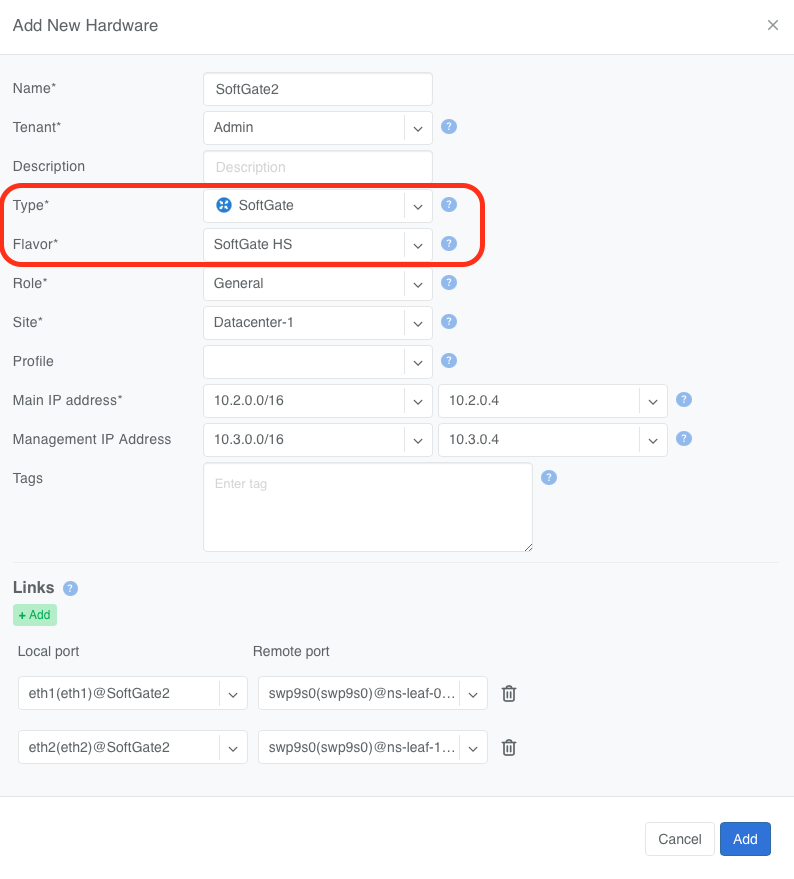
Provide the required information, including the Main IP address and the Management IP address. Netris recommends explicitly specifying the IP addresses of every SoftGate node.
However, you may leave the Main IP address and the Management IP Address set to Assign Automatically. If you do, Netris will automatically find the next available IP address in the earliest created subnet in the Netris IPAM with the appropriate Purpose (
purpose: loopbackfor loopback IPs andpurpose: managementfor management IPs) and assign it to the SoftGate.
Add Links. This tells Netris how this node is physically connected to the switching fabric.
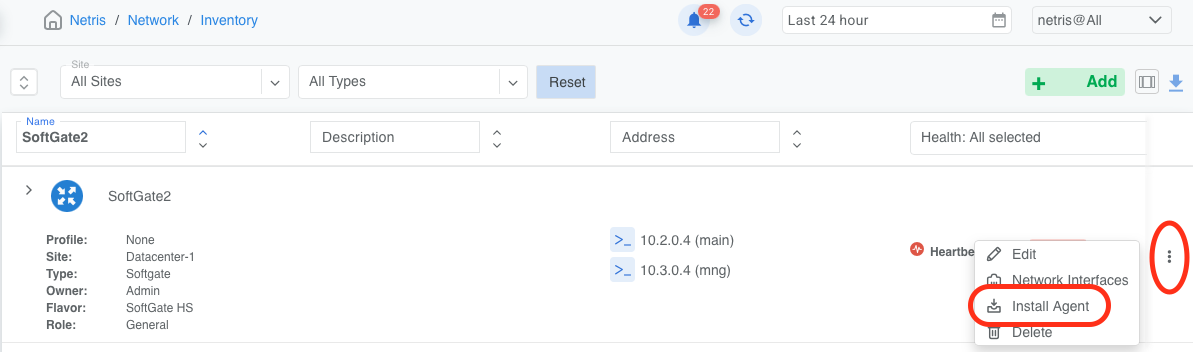
Locate the correct server object that represents the target SoftGate and click the three vertical dots (⋮) on the right side of the SoftGate node. Select Install Agent.
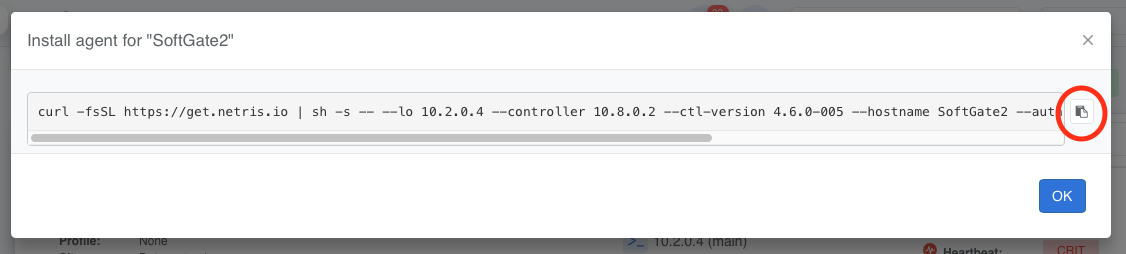
Copy the one-line installer command to your clipboard.
Tip
If you are upgrading from an earlier version, remove the installer.lock file before running the one-liner installer.
$ sudo rm /opt/netris/installer.lock
Paste the one-line install command on your SoftGate HS node as an ordinary user.
Warning
Keep in mind that one-line installer commands are unique for each node
Warning
Netris replaces Netplan with ifupdown and attempts to migrate any prior configuration to /etc/network/interfaces.
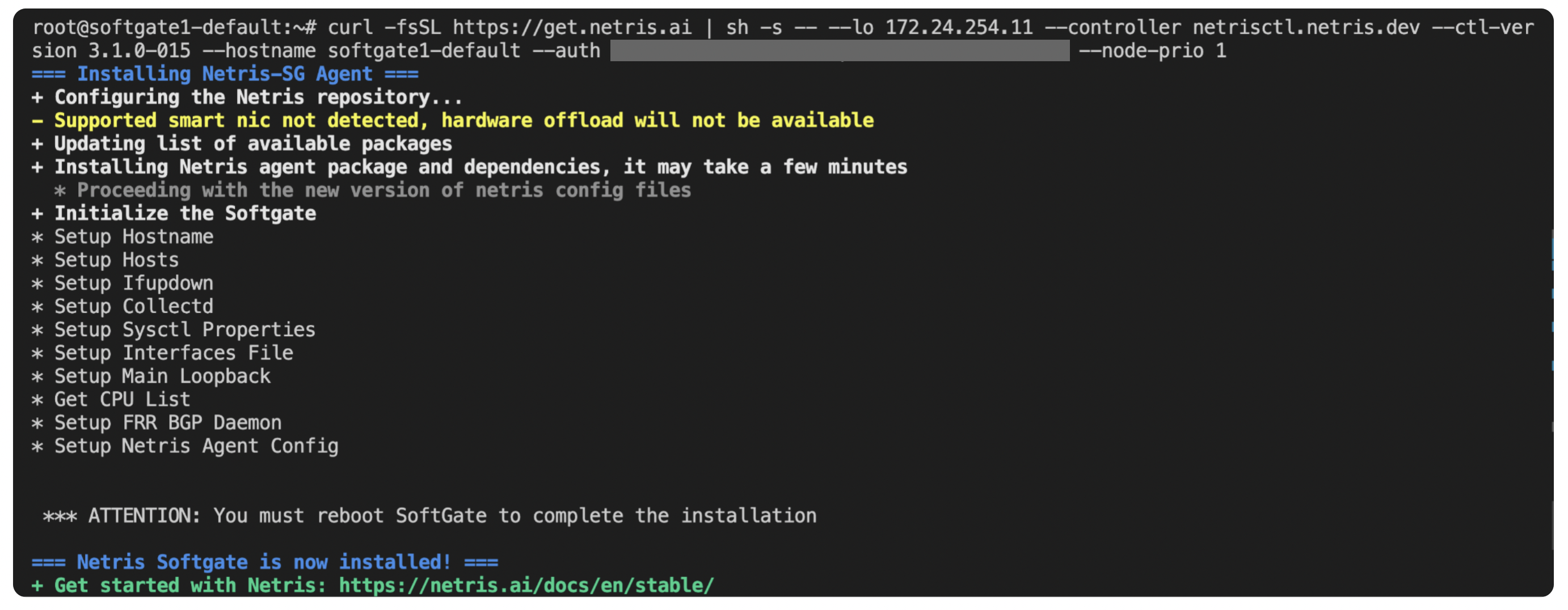
Reboot the SoftGate
$ sudo reboot
Once the SoftGate reboots, you should see the Heartbeat health check go from CRIT to OK.

See the Observability section for further validation and sanity checks.
Upstream/Border Routers (EBGP)
SoftGate is a highly available, horizontally scalable, multi-tenant, Netris-VPC-aware edge gateway cluster.
For full redundancy and proper routing, each SoftGate node in your SoftGate cluster must establish an EBGP relationship with each upstream router, such as your Internet border routers, ISP border routers, or Next Generation Firewalls (NGFW), depending on your overall network design.
A typical topology consists of:
Two (2) upstream routers
Two (2) SoftGates with role General
Two (2) SoftGates with role SNAT
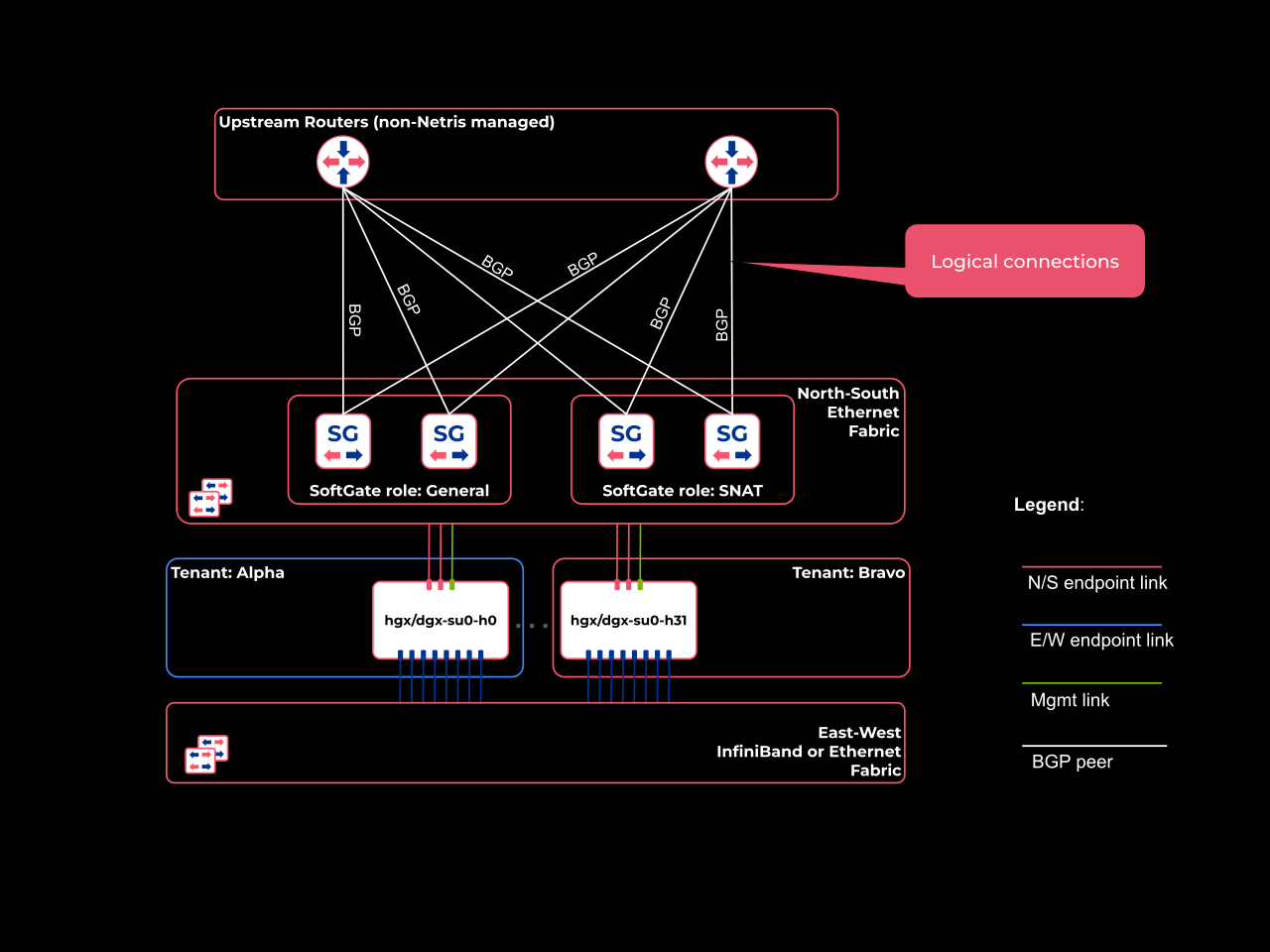
In the topology described above, Netris recommends establishing 8 EBGP sessions between your SoftGate layer and your upstream router layer (4 SoftGates x 2 routers = 8 sessions).
You can define EBGP connections to your upstream routers by navigating to Network -> E-BGP.
Configuring upstream BGP
(Detailed instructions to be added soon)
BGP route exchange between SoftGates, upstream routers, and downstream switches
Each SoftGate node will originate and advertise the prefixes described below. You can change this behavior by applying outbound prefix-lists (Prefix List Outbound field) to each E-BGP object in the Netris controller (Network->E-BGP).
Tip
This is closely related to, and possibly the same mechanism as, the Global Routing checkbox on an IPAM subnet — see Global Routing on the IPAM page. The exact relationship between that checkbox and the rule below is not yet confirmed; treat the rule below as the observed default behavior for vpc-1:Default subnets specifically.
By default, both General and SNAT roles SoftGates advertise all subnets configured in the Netris IPAM that meet all of the following conditions:
Non-RFC1918
Top-level objects
type:SubnetVPC
vpc1:Default
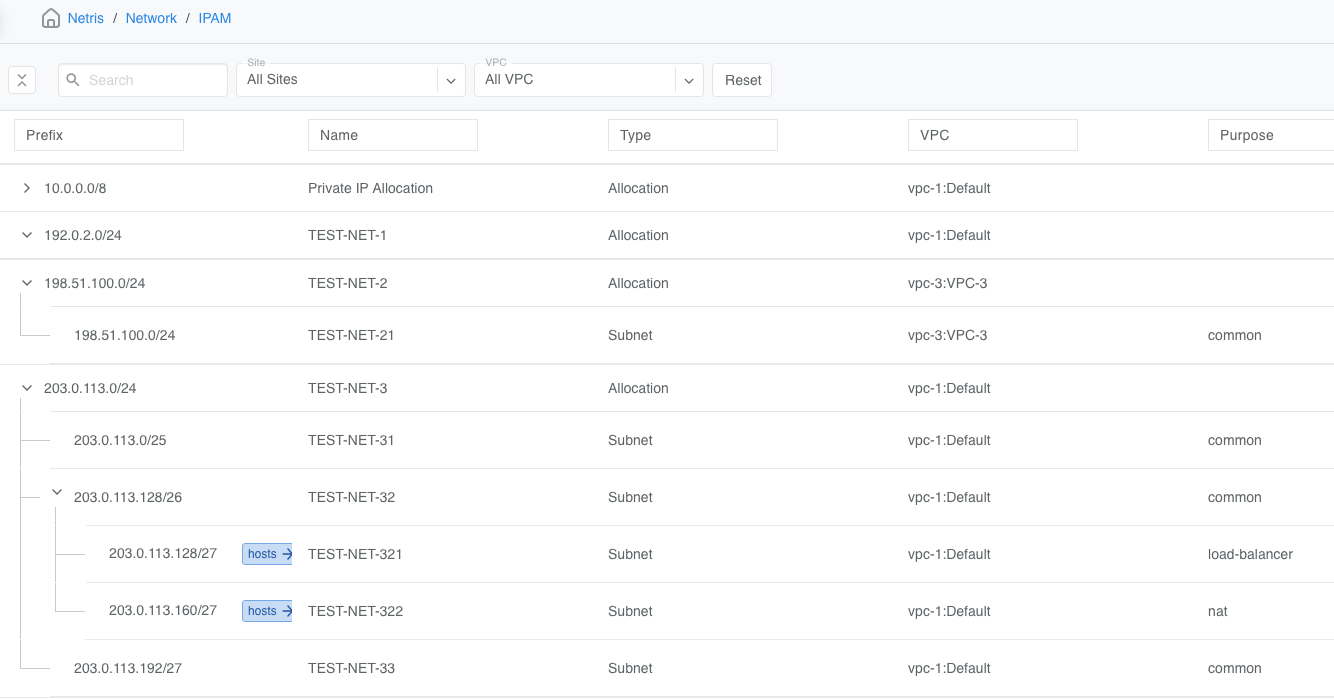
To further demonstrate this default behavior, consider the IPAM configuration above.
SoftGates will advertise to the upstream EBGP peers 203.0.113.0/25, 203.0.113.128/26, and 203.0.113.192/27 because they are (a) non-RFC1918, (b) top-level objects of (c)
type:subnet, and are in (d)vpc-1:Default.SoftGates will NOT advertise to the upstream EBGP peers 203.0.113.128/27 or 203.0.113.160/27, because they are nested under another object of
type:subnet, and therefore are not (b) “top object.”SoftGates will NOT advertise to the upstream EBGP peers 198.51.100.0/24, even though it is an (a) non-RFC1918, (b) top-level object of (c), because it is assigned to
vpc-3:VPC-3, i.e., a (d) non-Default VPC.SoftGates will NOT advertise 192.0.2.0/24 to upstream EBGP peers because it’s an object of type:Allocation, not
type:Subnet.
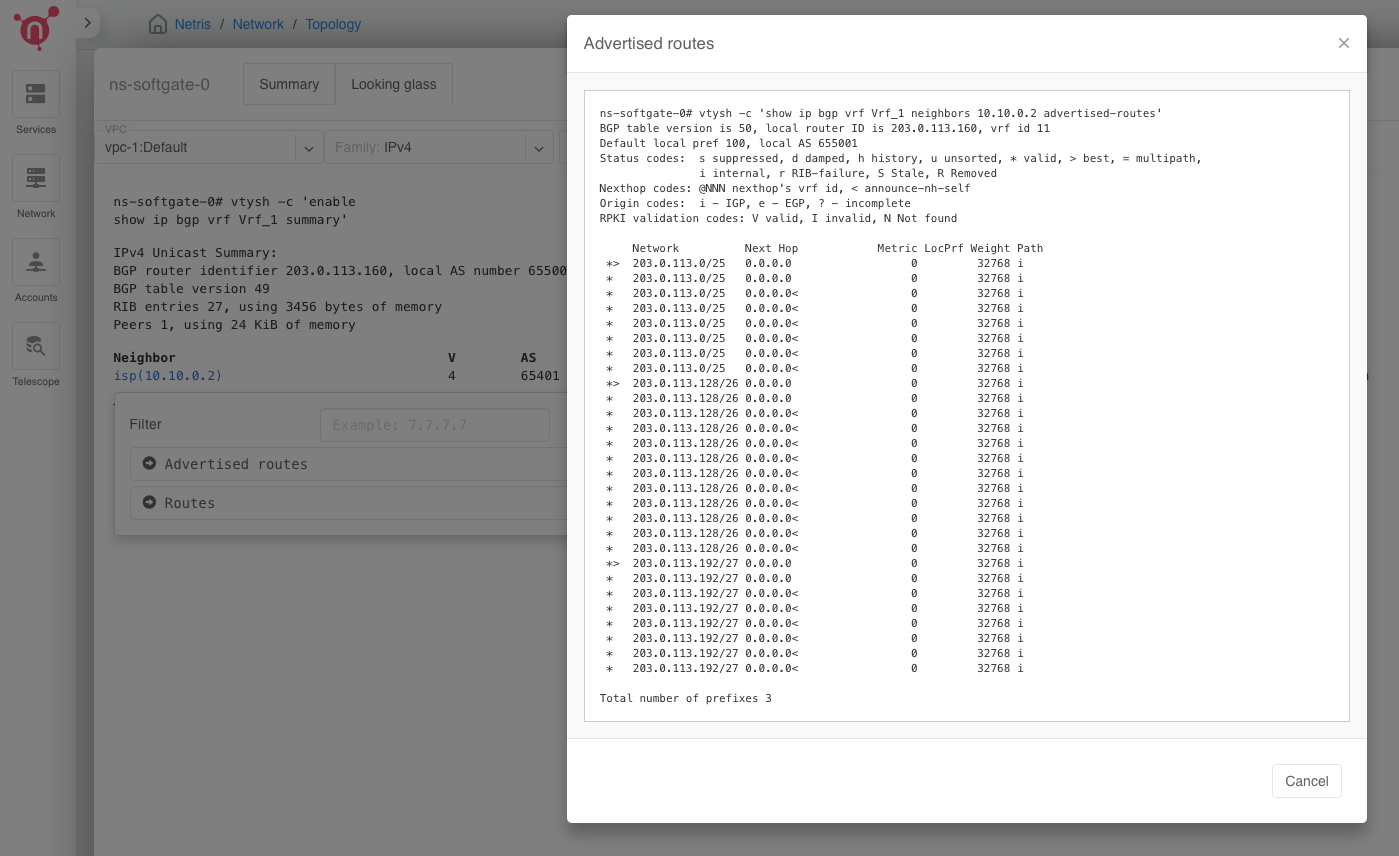
Below is the output of the show ip bgp neighbor advertised-routes command when the above configuration is in the Netris IPAM, and the Prefix List Outbound field in the E-BGP object for this EBGP connection is left empty.
Tip
You can obtain this information using the Looking Glass feature in the Netris controller UI. In Network > Topology, right-click a SoftGate node, select Details, select the Looking Glass tab, execute the BGP Summary command, click on the BGP neighbor IP in the output of the BGP Summary command, and select the Advertised Routes option.
Additionally, SNAT SoftGates originate (and advertise to the upstream neighbors, if permitted with an outbound prefix-list) /32 prefixes that correspond to global IPs of the SNAT rules configured in the Netris controller. This enables upstream routers to route packets directly to the correct SNAT SoftGate node. For each SNAT rule configured in the Netris controller, the Netris algorithm automatically selects an available SoftGate node with the SNAT role and, based on the Maglev algorithm, installs the SNAT rule on that SoftGate.
General SoftGates originate (and advertise to the upstream neighbors, if permitted with an outbound prefix-list) /32 prefixes that correspond to the global IPs of the L4LB or DNAT rules configured in the Netris controller. This enables upstream routers to route packets directly to the L4LB SoftGate nodes. Unlike with the SNAT rules, where only one of the SNAT SoftGates is configured for any given SNAT rule in the Netris controller, each General SoftGate is configured with every L4LB and DNAT rule that is configured in the Netris controller.
Tip
Configure your upstream routers to receive /32 prefixes from SoftGates for optimal routing and to prevent traffic from being forwarded internally if it arrives at the “wrong” SoftGate.
Warning
You cannot simultaneously configure the same Global IP address for SNAT and any other translation service.
High Availability and Load Distribution
SoftGate is a highly available, horizontally scalable, multi-tenant, Netris-VPC-aware edge gateway cluster.
In the SoftGate cluster, nodes operate without state replication between them for scalability and fault tolerance. The traffic distribution between nodes is achieved through a combination of the Maglev algorithm, BGP policies, and overall governance from the Netris controller.
Below is a high-level description of how the SoftGate layer of the Netris-managed fabric processes packets.
Netris VPC-originated traffic routing
Any packet originating from any Netris VPC in the North-South fabric with the destination of the Internet or any other destination outside of the North-South fabric is processed in the following fashion.
The packet is routed to its default gateway, hosted as an anycast gateway on a leaf switch.
The packet is routed to a General SoftGate using ECMP for load distribution. To achieve this, the General SoftGates inject a default route into the Netris VPC for which either a NAT or an L4LB service is configured.
The General SoftGate processes DNAT or L4LB packets directly, but redirects SNAT packets to the appropriate SNAT SoftGate. This redirection is load-balanced based on the global IP of the SNAT rule, using the Maglev algorithm to ensure different SoftGates reach the same forwarding outcome without sharing state.
Once the packet reaches the correct SNAT SoftGate, it replaces the source IP address and sends the packet to the Internet.
SNAT SoftGates remember state locally for port overloading but do not synchronize it with any other SoftGate.
General SoftGates do not track connections and are fully stateless to maximize performance.
Tip
If you require stateful and deep packet inspection services, these are out of scope for Netris SoftGate. Netris recommends deploying specialized hardware, such as a Next Generation Firewall (NGFW), upstream of Netris.
Tip
Netris VPC peering handles inter-VPC traffic, which is forwarded through switches and not routed to any SoftGates.
Tip
Once a NAT or L4LB service is configured in the Netris controller for a given VPC, the SoftGates with role General start advertising the default route into that VPC, and Internet-bound packets are routed to the General SoftGates. If no NAT or L4LB services are configured for a VPC, no default route will be advertised into that VPC.
Internet-originated traffic routing
Packets originating on the Internet or outside the Netris-managed fabric with a destination IP address configured in the NAT or L4LB services are processed as follows.
Your upstream router forwards the inbound packet based on the routing information advertised by the SoftGates. As described in the BGP route exchange section of this document, all SoftGate nodes (General and SNAT) advertise the top-level subnets to all their upstream peers.
If you did not apply any outbound prefix-lists (Prefix List Outbound field), the inbound packet will be forwarded to one of the deployed SoftGates based on ECMP.
If a custom outbound prefix-list is in use and specifically permits/32 prefixes, the packet will be forwarded to the appropriate SoftGate node based on these /32 route announcements.
If the upstream router routes a packet to the appropriate SoftGate based on a /32 prefix, the SoftGate performs the appropriate translation and forwards the packet into the appropriate V-Net.
If upstream routers do not learn /32 prefixes (because policy or another reason prevents it), the packet may be routed to a SoftGate node that cannot perform the required translation directly. In this case, the receiving SoftGate will automatically forward the packet to the appropriate SoftGate nodes based on policy-based routing configured by Netris to handle this situation.
Failover behavior
Netris configures all DNAT and L4LB services on all SoftGate nodes with the role General.
Netris configures a given SNAT rule on exactly one SoftGate node with the SNAT role. The node is chosen using a deterministic, consistent hashing algorithm.
This approach keeps the Netris SoftGate layer highly available and robust in various hardware failure scenarios.
In case of a SoftGate node failure
If the failed SoftGate instance’s role is General, the controller raises an alarm, but the Netris algorithm takes no further action. Existing TCP sessions remain intact. All traffic is automatically routed to the remaining General SoftGate nodes.
If the role of the failed SoftGate instance is SNAT, all the SNAT rules that were assigned to the failed SoftGate instance are evenly redistributed to all other SoftGates with the role SNAT. TCP sessions that traversed the failed node will reset.
Note that SNAT service is the only stateful translation service provided by SoftGates. SNAT connections will be interrupted as the SNAT rules are reconfigured on the surviving SoftGate nodes and must be reestablished. However, DNAT and L4LB connections are stateless and will remain unaffected during a SoftGate node failure.
When a SNAT SoftGate recovers, Netris will return the earlier redistributed SNAT rules to the recovered node.
When an additional SNAT SoftGate is added to the deployment, as opposed to having recovered from an earlier failure, Netris will execute a SNAT rule reshuffle to redistribute all configured SNAT rules across all deployed SNAT SoftGates. This action may briefly interrupt existing SNAT connections while the rules are redistributed.
Observability and Operations
(coming soon)