 Join Slack
V-Net
Introduction
A V-Net (Virtual Network) is a Netris construct for grouping switch ports into a defined network segment—much like a traditional VLAN or a public cloud subnet. It is a virtual networking service that provides Layer-2 (unrouted) or Layer-3 (routed) virtual network segments in a Netris VPC. V-Net is assigned to one VPC and one or multiple sites. Your endpoints (servers, VMs) are connected to V-Nets.
To build a V-Net you need to supply
Netris, having already configured the EVPN underlay, then automatically pushes the entire under-the-hood V-Net configuration to every Ethernet switch and DPU in the fabric:
VLAN-to-VNI mapping, when needed
Anycast gateway IP/MAC on every leaf that hosts the V-Net, when a gateway is specified
Assign switch ports to the appropriate VLANs or configure L3 physical/subinterfaces
Set MTU
Configure custom LLDP TLVs
Netris V-Net supports two transport modes:
L2VPN (Layer 2 Virtual Private Network) is similar to a traditional VLAN with modern and scalable implementation. It is typically used for front-end (North-South) or management/Out-of-Band networks. Add a gateway, and it behaves like a VLAN with an SVI / IRB.
L2VPN is implemented with VXLAN (Virtual Extensible LAN) transport and is a technology that enables the creation of Layer 2 switched overlays on top of a Layer 3 routed infrastructure. Often used in data centers to provide flexibility and scalability, VXLAN encapsulates Ethernet frames within UDP packets, enabling Layer 2 segments to span across a routed network. EVPN (Ethernet VPN) is a control plane protocol that works with VXLAN to distribute MAC address information and manage traffic to enable efficient and scalable Layer 2 connectivity.
L3VPN is typically used for back-end (east–west) connectivity in GPU clusters on Ethernet-based AI fabrics such as NVIDIA Spectrum-X. Built as one mini-subnet per switch port, a VXLAN L3VPN is conceptually similar to MPLS L3VPN in provider networks.
VXLAN L3VPN is implemented by extending VXLAN’s overlay capabilities to support Layer 3 routing between different Layer 2 networks (VNIs). This is achieved by using an IP VRF and a Layer 3 VNI (VXLAN Network Identifier) within the VXLAN tunnel to forward routed traffic between VNIs. Essentially, VXLAN provides the encapsulation and tunneling, while EVPN (Ethernet VPN) distributes reachability information using BGP.
Each switch port gets its own /31 IPv4 (RFC 3021) or /127 IPv6 (RFC 6164) address; the leaf’s address becomes the server’s default gateway. All of those “2 host” subnets are advertised inside the VPC’s VRF, so every server can reach every other purely through routing—there is no shared Layer-2 broadcast domain.
L2VPN V-Nets
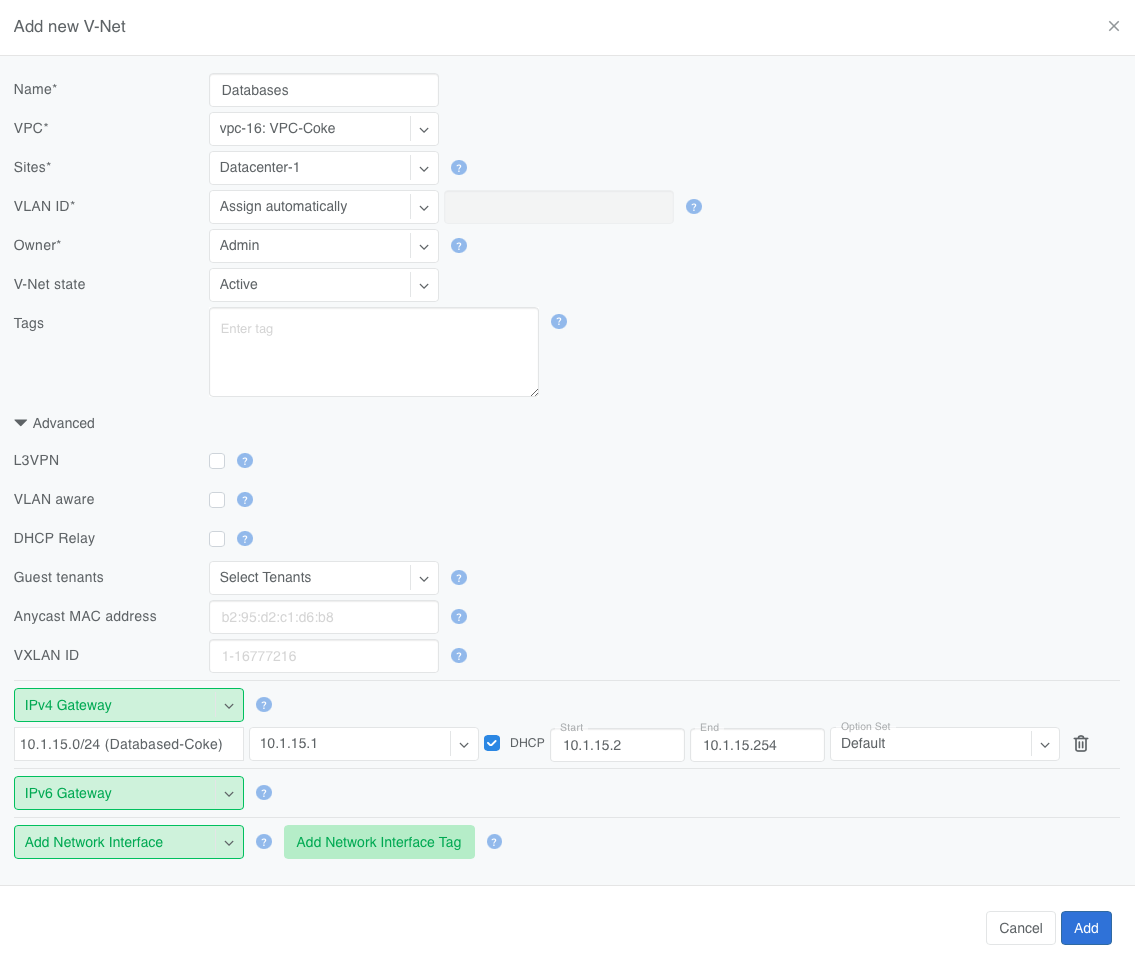
You can start creating a new V-Net by navigating to Services -> V-Net and clicking +Add in the top right.
- Every V-Net must include:
Name of the V-Net,
VPC containing the V-Net,
Sites where V-Net is deployed,
VLAN ID (for L2VPN V-Nets), which Netris will assign when set to Automatic,
Owner administering the V-Net,
V-Net state,
List of switch ports to include in the V-Net; they can be explicitly listed or referenced via Labels (see below).
- Optionally, a V-Net definition can also include:
Labels for dynamic switch port inclusion into the V-Net,
List of collaborators (Guest tenants) who can add or remove switch ports to and from the V-Net, but not edit any other properties of the V-Net,
IP Address Family (IPv4 only, IPv6 only, or IPv4/IPv6 Dual-Stack) to specify the type of gateway IP configured on the V-Net,
IPv4 or IPv6 Gateway (for L2VPN V-Nets) to make the V-Net routable inside the VPC, i.e., add an SVI to the VLAN,
For L2VPN V-Nets, DHCP scope and option set (SoftGate required) or DHCP Relay configuration,
Anycast MAC address (for L2VPN V-Nets), which Netris can assign for you,
VXLAN ID,
IPv6 Neighbor Discovery configuration.
V-Net Fields explained
Field |
What it does |
Notes / defaults |
|---|---|---|
Name |
Unique name for the V-Net. |
Must be globally unique. |
VPC (Virtual Private Cloud) |
Construct that contains the V-Net. |
A VPC must exist first. For an L3VPN V-Net on NVIDIA Cumulus, you can select a Dynamic VPC Group here instead of a VPC, so that each switch port’s VPC is chosen by 802.1X at authentication time. See Dynamic VPC assignment below. |
Sites |
One or more sites where the V-Net will run. |
Sites must belong to the chosen VPC. Multi-site V-Nets would require backbone connectivity between sites. |
VLAN ID |
|
Always visible. When L3VPN is enabled this field is auto-set to Disabled and cannot be changed. |
Owner |
User group with full edit rights. |
Can change any setting: name, VLANs, gateways, DHCP, tags, and so on |
V-Net state |
Active or Disabled. |
Disabled = config withdrawn from switches. |
Tags |
Free-form labels for search/filter. |
Example: prod, gpu, east-1. |
Add Network Interface |
Explicitly attach switch ports to the V-Net. |
Use when exact ports are known. Switch Port should be assigned to the owner or collaborator under |
Add Network Interface Tag |
Attach ports by label. |
Useful for large server fleets. |
Untagged |
Set port to untagged mode. Triggers whether traffic should be sent VLAN tagged (trunk mode) or VLAN untagged (access mode) for this switch port. |
VLAN tags are only significant on each port’s ingress/egress unless VLAN aware mode is used. |
Advanced V-Net Fields explained
Field |
What it does |
When it appears |
|---|---|---|
L3VPN |
Puts the V-Net in Layer-3 mode: Netris assigns each switch port a /31 and sets the leaf’s IP as the host’s gateway. |
Ethernet fabrics only. Enabling L3VPN forces VLAN ID = Disabled. |
VLAN-aware |
Lets one V-Net carry multiple VLAN tags inside a single VXLAN ID. Think of this like Q-in-Q, but it’s Q-in-VxLAN. |
Requires switches that support VLAN-aware bridging. |
Guest Tenants (Collaborators) |
Admin units that may add/remove switch ports but cannot change core settings. |
Optional; owner always retains full control. |
IP Address Family (IPv4 only, IPv6 only, or IPv4/IPv6 Dual-Stack) |
Determines the type of gateway IP configured on the V-Net. |
Default = IPv4/IPv6 Dual-Stack. |
Anycast MAC address |
Overrides the auto-generated anycast MAC. |
Leave blank to use the default. |
VXLAN ID |
VXLAN Network Identifier (1 – 16777216). |
Auto-assigned unless you enter a value. |
IPv4 Gateway / IPv6 Gateway |
Anycast gateway IPs for Layer-3-enabled L2VPN. |
Hidden when L3VPN is on. Leave blank for pure Layer-2 V-Net. Must be configured under |
IPv6 Neighbor Discovery |
Master switch for Netris-managed IPv6 ND. Unchecked (default): Netris does not manage IPv6 ND for this V-Net; the fabric’s vendor-default behavior applies, and none of the fields below are shown. Checked: reveals Mode (defaults to Enabled) and the fields below. Within this group, an unchecked checkbox always means explicitly off, not “vendor default” — only a blank text field (a lifetime or interval) falls back to the vendor default. |
|
Mode (Enabled / Disabled) |
Enables or disables active Router Advertisement (RFC 4861) on the segment. |
Requires IPv6 Neighbor Discovery checked. Enabled requires an IPv6 Gateway configured on the V-Net. Disabled explicitly suppresses ND regardless of the platform default and does not require a gateway; it also hides and resets Router Lifetime, Advertisement Interval, the M/O flags, Prefix Advertisement, and RDNSS below. |
Router Lifetime |
RA Router Lifetime, in seconds. Left blank, the switch agent uses the platform’s vendor default. |
Requires IPv6 Neighbor Discovery checked and Mode = Enabled. |
Advertisement Interval |
Interval between RA transmissions, in seconds. Left blank, uses the platform’s vendor default. |
Requires IPv6 Neighbor Discovery checked and Mode = Enabled. |
Managed Config (M flag) |
RA Managed Configuration flag. Unchecked = explicitly off. |
Requires IPv6 Neighbor Discovery checked and Mode = Enabled. |
Other Config (O flag) |
RA Other Configuration flag. Unchecked = explicitly off. |
Requires IPv6 Neighbor Discovery checked and Mode = Enabled. |
Prefix Advertisement |
Enables the Prefix Information Option (RFC 4861 §4.6.2) carried in RA. Unchecked = explicitly off. |
Requires IPv6 Neighbor Discovery checked and Mode = Enabled. |
Preferred Lifetime |
Prefix Information Option Preferred Lifetime, in seconds. Left blank, uses the platform’s vendor default. |
Requires Prefix Advertisement checked. |
Valid Lifetime |
Prefix Information Option Valid Lifetime, in seconds. Left blank, uses the platform’s vendor default. |
Requires Prefix Advertisement checked. |
Autoconfig (A flag) |
Prefix Information Option Autonomous flag; triggers SLAAC (RFC 4862) on clients. Unchecked = explicitly off. |
Requires Prefix Advertisement checked. |
RDNSS (Recursive DNS Server) |
Enables the RDNSS option (RFC 8106). Unchecked = explicitly off. |
Requires IPv6 Neighbor Discovery checked and Mode = Enabled. |
DNS Servers |
Up to three IPv6 DNS server addresses advertised via RDNSS. |
Requires RDNSS checked. |
DNS Server Lifetime |
RDNSS lifetime, in seconds. Left blank, uses the platform’s vendor default. A separate Infinite checkbox sets the lifetime to never expire. |
Requires RDNSS checked. |
Warning
Many switches cannot autodetect 1Gbps link speed. If attaching hosts with 1Gbps NICs to 10Gbps switch ports, set the speed for the given Switch Port from Auto(default) to 1Gbps. You can edit a port in Network -> Network Interfaces individually or in bulk.
Multisite V-Nets
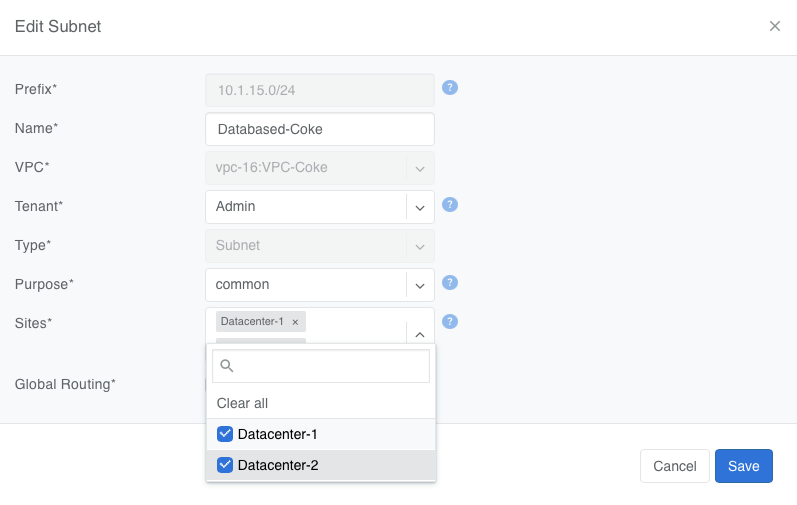
Any V-Net may span multiple Netris Sites. If the V-Net spans multiple sites and you add a gateway, you must first create the subnet under Network -> Subnets and assign it to all sites the V-Net will span (You can define additional sites in Network -> Sites). This way the anycast IP is valid everywhere.
Link Aggregation and Multihoming
V-Net switch ports support Link Aggregation (LAG) for higher throughput and redundancy, including automatic EVPN Multi-Homing and manually configured MC-LAG. See Link Aggregation and Multihoming for details.
DHCP
L2VPN V-Nets may include a native, Netris-managed DHCP service (SoftGate required), or a DHCP Relay to an external non-Netris-managed DHCP server. See DHCP and DHCP Relay for details.
Labels
Labels let you dynamically place switch ports into a V-Net by tagging server NICs, instead of listing switch ports explicitly. See Labels for details.
L3VPN
L3VPNs are typically used for back-end (east–west) connectivity in GPU clusters on Ethernet-based AI fabrics such as NVIDIA Spectrum-X.
L3VPN turns every switch port in the V-Net into its own /31 IPv4 (or /127 IPv6) routed link to the server. There is no fabric-wide broadcast domain; all traffic is routed from the first hop. The leaf-side switch port IP is the server’s gateway.
This method is commonly used on rail-optimized AI fabrics where each server NIC is dedicated to a GPU and has an individual /31 IP. Thorough planning of the IP schema and server-side routing configuration is required for this to function. Contact Netris for more details.
Netris still moves packets over VXLAN and advertises the /31 prefixes with EVPN, giving you VRF-style isolation without MPLS.
Creating an L3VPN V-Net
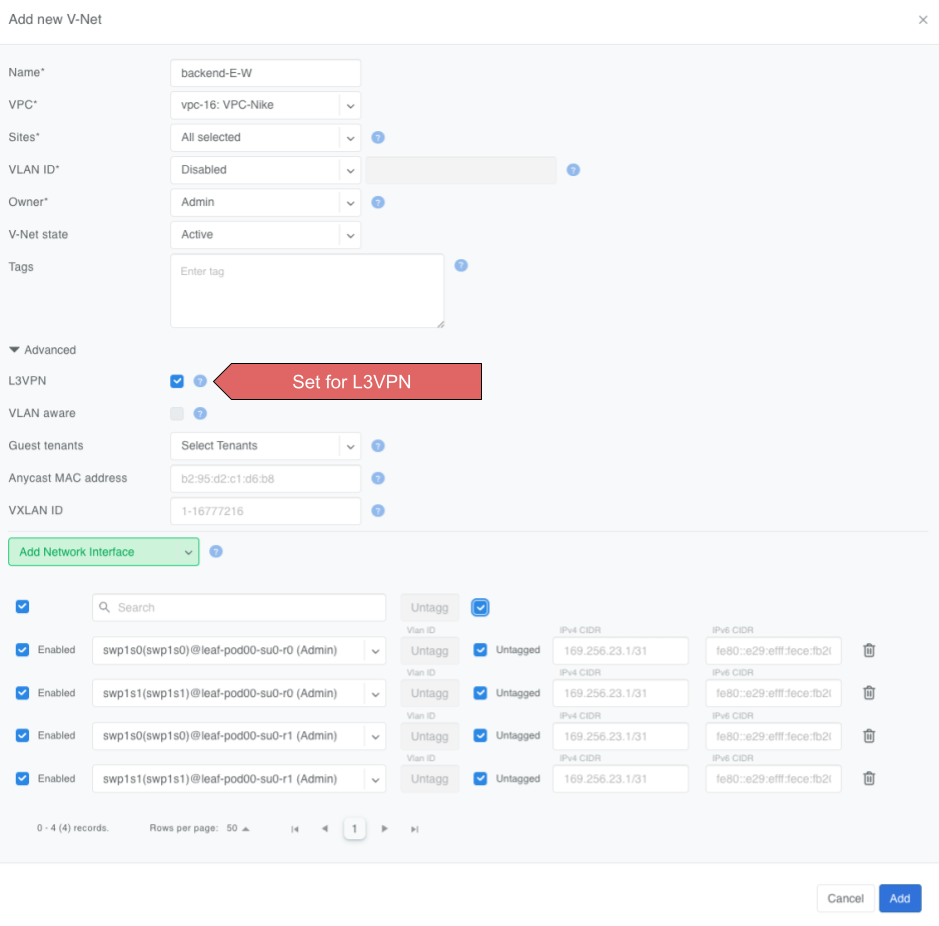
L3VPN V-Nets require you to provide much the same information as the L2VPN V-Nets, such as a name, parent VPC, site(s), and a list of switch ports, but with a few key differences.
Set the L3VPN checkbox.
The VLAN ID field locks to Disabled.
Gateway and DHCP options disappear—routing is handled on the /31 links.
Anycast MAC address is ignored.
Add switch ports (directly, by label) and, per port:
Untagged – makes the port an access interface.
VLAN ID – optional; enter a tag to create a routed sub-interface instead.
IPv4 / IPv6 – optional; leave blank to let Netris auto-allocate the /31 or a /127 pair.
Warning
Typically /31s get assigned to links with Terraform during the onboarding phase.
Behind the scenes, Netris
Reserves or accepts a VXLAN ID for the V-Net.
Creates a routed interface (or sub-interface if you set a VLAN ID) for each selected port.
Assigns a /31 IPv4 (and /127 IPv6 if enabled) to every appropriate port on every appropriate switch.
Advertises every /31 with EVPN route-type 5 so other leaves learn the host prefixes without flooding.
Rules and limits
VLAN-aware mode is not available with L3VPN.
DHCP (including DHCP Relay) and Anycast gateway are intentionally disabled; each server must configure its own IP on the peer side of the /31.
The Untagged toggle and per-port VLAN ID apply only to the interface you are adding; they never create a global broadcast domain.
With these steps, you have a routed, broadcast-free V-Net ready for high-scale east–west traffic.
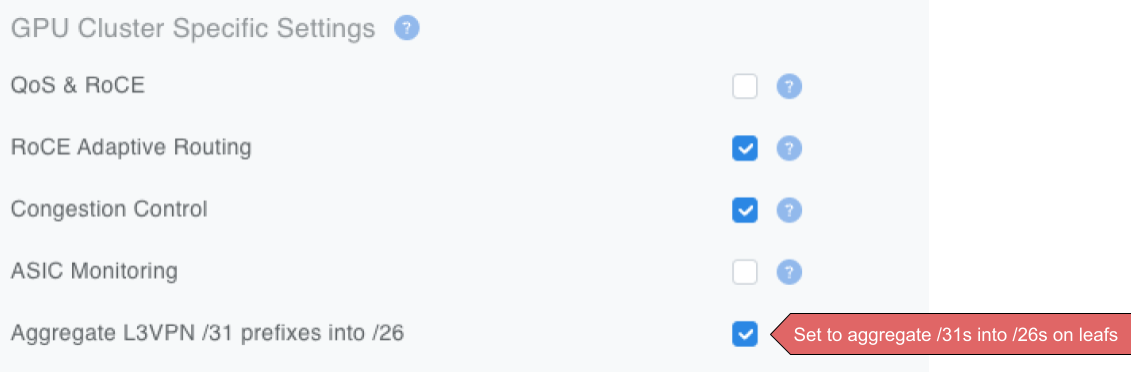
In larger fabrics, Netris recommends turning on the optional /26 aggregation in the Inventory Profile (Network -> Inventory Profiles) to reduce TCAM usage in the hardware.
Dynamic VPC assignment
An L3VPN V-Net normally resolves to one VPC, and every routed link in it is routed in that VPC’s VRF. On NVIDIA Cumulus, you can instead bind the V-Net to a Dynamic VPC Group. Each server then authenticates over 802.1X, RADIUS returns a VRF name, and that switch port’s routed link is placed in the VRF of the VPC its credential maps to. Two servers on the same V-Net can end up in different VPCs.
Select the group in the VPC dropdown, where Dynamic VPC Groups are listed under a Dynamic VPC header above the VPCs. The group is offered only once L3VPN is selected and a V-Net owner is set, every member switch port must be untagged, and the group is read-only after the V-Net is created. Switch port IP addressing is unchanged.
See Dynamic VPC Assignment with 802.1X for the Dynamic VPC Group object, the RADIUS models, and the server-side supplicant configuration.
Verification Tools
UI Tools
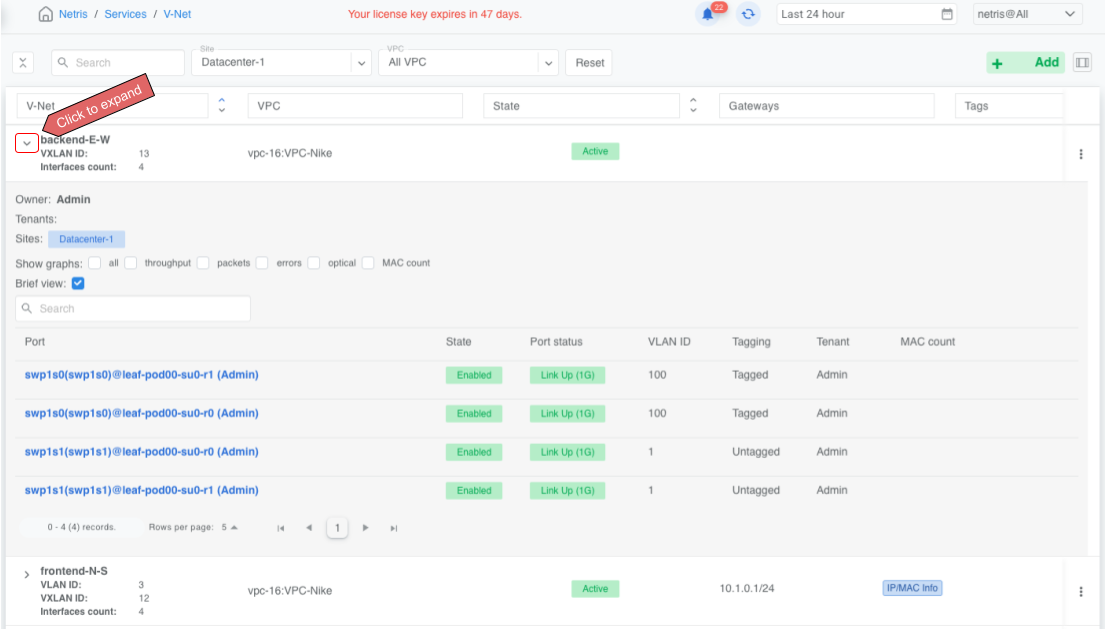
You can view all existing V-Nets by navigating to Services -> V-Net.
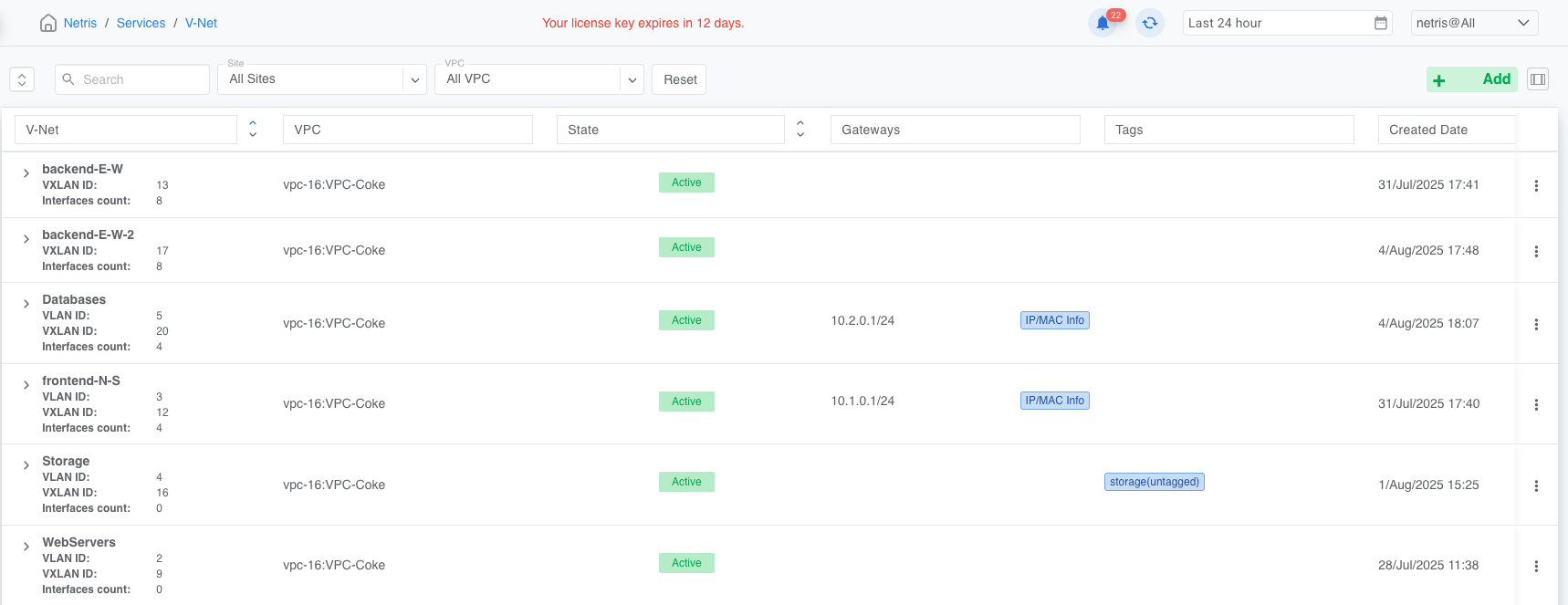
You can view additional operational details of any V-Net by clicking on the chevron to the left of the V-Net name to expand the view.