
 Join Slack
BGP
BGP Overview
Netris uses BGP to connect tenant VPCs and management networks to the world outside the Netris-managed fabric — upstream carriers, non-Netris-managed data center networks, WAN routers, and security appliances such as firewalls.
There are two main types of BGP-enabled connectivity:
SoftGate-terminated BGP — the session terminates on a SoftGate node. Typically used for connecting to ISPs, border routers, and similar upstream peers, since SoftGate also provides NAT and Layer-4 load balancing for that traffic.
Tip
A subnet must additionally have its Global Routing checkbox enabled to be eligible for this kind of external advertisement — see Global Routing on the IPAM page.
VPC Connect (switch-terminated BGP) — the session terminates directly on a routed switch port or on a V-Net. Typically used to establish line-rate connections to external gateways that don’t require NAT or L4LB as part of the connection.
Typical use cases are connecting the Netris-managed fabric to external networks such as WAN, non-Netris-managed parts of the data center network, Internet Service Providers, and similar external networks.
Basic BGP
BGP neighbors are declared in the Network → E-BGP section. Netris software automatically generates and programs the network configuration to meet the requirements.
Two independent choices define a BGP session with an external neighbor to the Netris-managed fabric:
BGP Router — the switch (or SoftGate) that hosts the local BGP speaker and where the Netris-managed side of the session terminates.
Local endpoint interface — either a routed switch port or a V-Net (a.k.a. BGP terminated on V-Net), selected by setting either Switch port or Connect via V-Net (under Advanced). A V-Net used this way gets a dedicated SVI on the BGP Router, and that SVI carries the Local IP. Whether the V-Net has a gateway depends on where the switch port is — see the table below.
The peer-facing port can be any port on the Netris-managed fabric; it does not have to sit on the switch selected as the BGP Router. When the port and the BGP Router are on different switches, Netris connects the two automatically — it creates a dedicated SVI on the BGP Router and provisions a hidden (meaning not visible in the GUI under the V-Net menu) “virtual wire” V-Net to the switch where the peer is physically connected.
Warning
A V-Net with a gateway can be used for BGP termination only when the BGP Router is the switch where the switch port is.
The Local IP is either the V-Net gateway address itself or a secondary IP address on the same SVI, not a separate interface.
Arista switches don’t support secondary addresses on an SVI, so the Local IP must be the V-Net gateway address.
The resulting combinations:
Local endpoint |
Switch port on the BGP Router |
Switch port on a different switch |
|---|---|---|
Routed switch port |
The session and the port are on the same switch. |
Netris builds a virtual wire from the peer’s port to the SVI created on the BGP Router. |
V-Net without a gateway |
Netris creates a dedicated SVI in that V-Net for this BGP session on the BGP Router; that SVI is the local endpoint. |
The V-Net extends to the BGP Router, and the dedicated SVI there terminates the session. |
V-Net with a gateway |
The session terminates on the V-Net SVI on that switch. The Local IP is the gateway address, or a secondary address on the same SVI (secondary addresses are not supported on Arista). |
Not supported. |
Adding BGP Peers
Navigate to Network → E-BGP in the web UI.
Click the Add button.
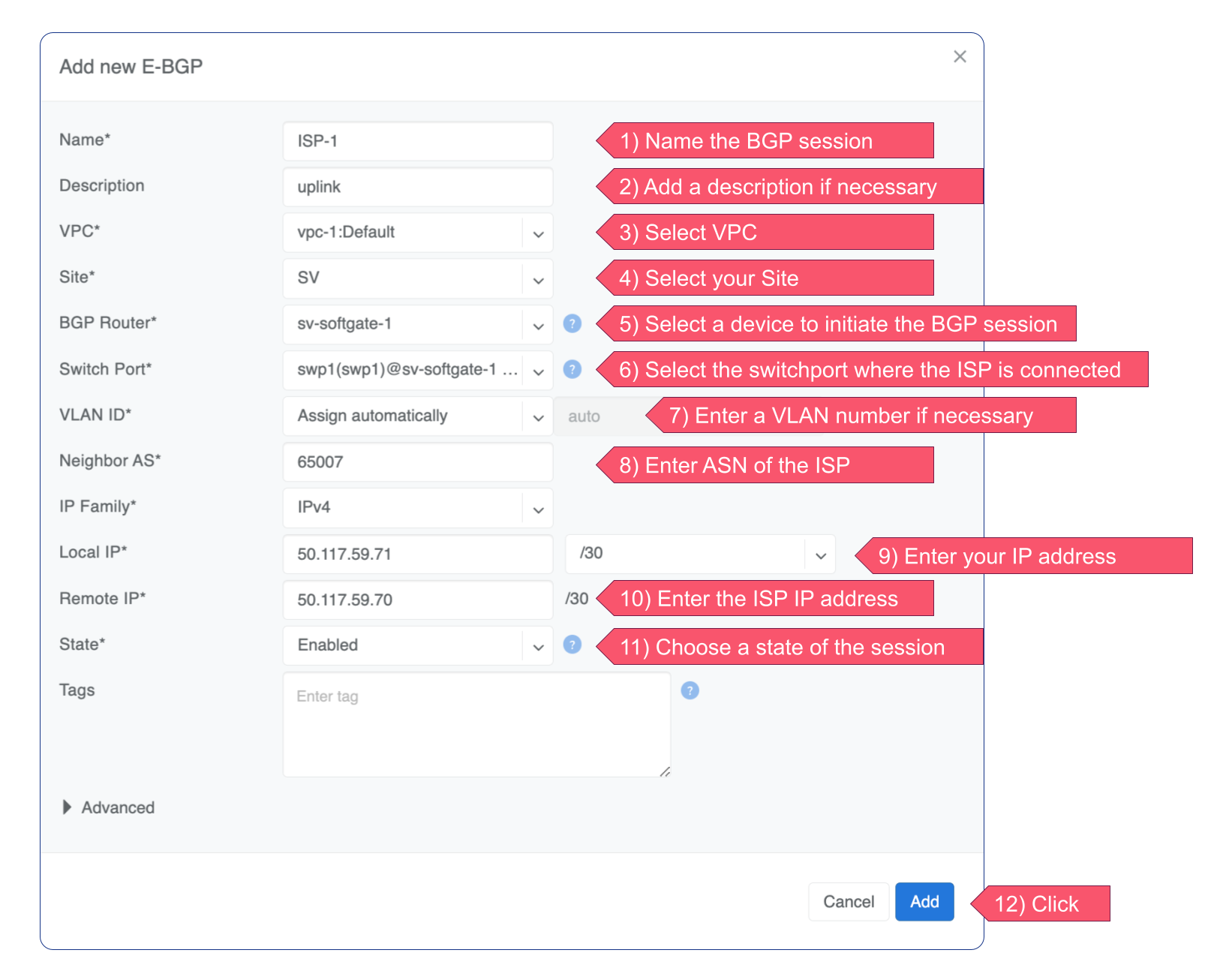
Fill in the fields as described in the table below.
Click the Add button.
Name |
User-assigned name of the BGP session. |
Description |
Free description. |
VPC |
VPC to which the BGP session belongs. |
Site |
The Site (data center) where this BGP session should be terminated. |
BGP Router |
The Netris-managed node (switch or SoftGate) terminating the BGP session. |
Switch port |
Switch Port where the physical cable to the remote BGP neighbor is connected (any port on the fabric). If terminating the BGP session on a V-Net (see Advanced>Connect via V-Net), this option is disabled and the switch port must be added to the V-Net rather than being selected here. |
VLAN ID |
Optionally tag with a VLAN ID (usually untagged). Disabled if terminating the BGP session on a V-Net (see Advanced> Connect via V-Net option below). |
Neighbor AS |
The remote side’s Autonomous System number. (Local AS is defined in the Advanced section) |
IP Family |
IPv4 or IPv6. |
Local IP |
BGP peering IP address on the Netris-controlled side. When terminating on a V-Net (Advanced > Connect via V-Net), this is the IP address of the dedicated SVI Netris creates in that V-Net for this BGP session. |
Remote IP |
BGP peering IP address on the remote end. |
State |
Administrative State (Enabled/Disabled). |
Labels |
Tags associated with the BGP session. |
Advanced |
Advanced policy settings are described in the next section. |
Example: Declare a basic BGP neighbor.
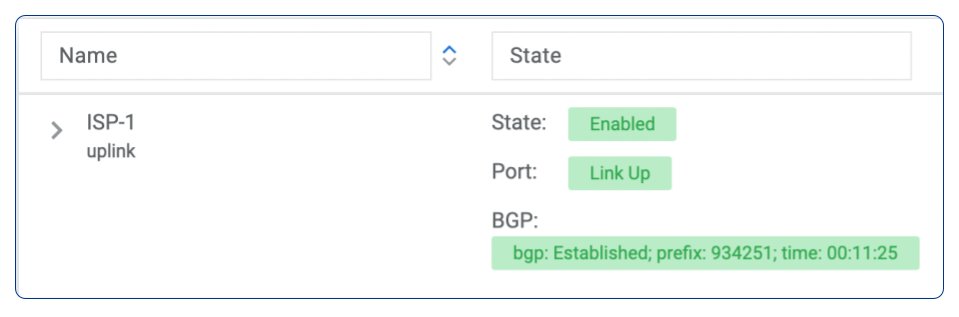
If everything is correct, State, port, and BGP status will turn green.
Advanced BGP
BGP neighbor declaration can optionally include advanced BGP attributes and BGP route-maps to fine-tune BGP policies.
Click Advanced to expand the BGP neighbor add/edit window.
Connect via V-Net |
Select a V-Net if the BGP session is to be established with an endpoint from that V-Net rather than with the switch port directly. You can use a V-Net without a gateway regardless of which switch the switch port is on. You can use a V-Net with a gateway only when the BGP Router is the switch where the switch port is; in that case, the Local IP is the V-Net gateway address or a secondary address on the same SVI (secondary addresses are not supported on Arista). |
BFD |
Enable/Disable BFD. |
BGP Timers |
Keepalive (Hello) Interval, Hold Time, and Connect Retry timers for the BGP session. Netris default values are 3 10 10. |
Neighbor address |
IP address of the neighbor when peering with the loopback IP address instead of the interface IP address (aka Multihop). |
Update source |
When Multihop BGP peering is used, it lets the operator choose one of the SoftGate node’s loopback IP addresses as the BGP speaker source IP address. |
BGP password |
Password for the BGP session |
Remove Private AS |
Strip private ASNs (64512–65534, or 4200000000–4294967294 for 4-byte ASNs) from the AS-PATH before advertising to this neighbor. Enabled by default. If multiple SoftGates advertise the same prefix to the same upstream, enabling or disabling this affects whether their AS-PATHs end up identical or distinct. See the note below this table for more details. |
Local ASN |
The local Autonomous System Number the BGP speaker advertises for this session. Three options: Site Public ASN (default) — use the AS number defined as the Public ASN in the current Site configuration. Switch Local ASN — if a switch is selected as the BGP Router for this session, use that switch’s individual local ASN. Not applicable when the BGP Router is a SoftGate. Custom ASN — enter a specific AS number for this session only. |
Allowas-in |
Define the number of allowed occurrences of the self AS number in the received BGP NLRI to consider it valid (normally 0). |
Default Originate |
Originate default route to the current neighbor. |
Prefix Inbound Max |
Drop the BGP session if the number of received prefixes exceeds this max limit. For switch termination, the maximum allowed is 1000 prefixes, and SoftGate termination can handle up to one million prefixes. |
Inbound Route-Map |
Apply BGP policies described in a route-map for inbound BGP updates. |
Outbound Route-Map |
Apply BGP policies described in a route-map for outbound BGP updates. |
Local Preference |
Set local preference for all inbound routes for the current neighbor. |
Weight |
Set weight for all inbound routes for the current neighbor. |
Prepend Inbound (times) |
Number of times to prepend own AS number for inbound routes. |
Prepend Outbound (times) |
Number of times to prepend own AS number for outbound routes. |
Prefix List Inbound |
List of IP address prefixes to permit or deny inbound. |
Prefix List Outbound |
List of IP address prefixes to permit or deny outbound. |
Send BGP Community |
List of BGP communities to send to the current neighbor. |
Effect of Remove Private AS on prefixes advertised by SoftGate nodes to their upstream BGP neighbors:
Typically, all SoftGate nodes in a deployment share the same AS number.
All SoftGate nodes advertise all prefixes (locally originated as well as originated on other SoftGate nodes and subsequently learned through the fabric) to their upstreams.
When Remove Private AS is enabled (the checkbox is set), all inter-SoftGate path information is stripped from the AS PATH before the prefix is advertised upstream; thus, each prefix appears to the upstream BGP neighbor as equidistant (ECMP). As a result, some traffic might be forwarded to SoftGates that then have to forward it again to the “correct” SoftGate, resulting in suboptimal routing and increased load.
With the Remove Private AS toggle set to off (check box is cleared), the AS PATH of each prefix will include the full list of ASNs, including the list of ASNs of switches connecting SoftGates to each other. Because of this, on any given SoftGate, locally originated prefixes will always have the AS PATH shorter than prefixes learned through the switch fabric from other SoftGates.
BGP Objects
Under Network → E-BGP objects, you can define various BGP objects referenced from a route-map to declare a dynamic BGP policy. Supported objects include:
IPv4 Prefix
IPv6 Prefix
AS-PATH
Community
Extended Community
Large Community
IPv4 Prefix
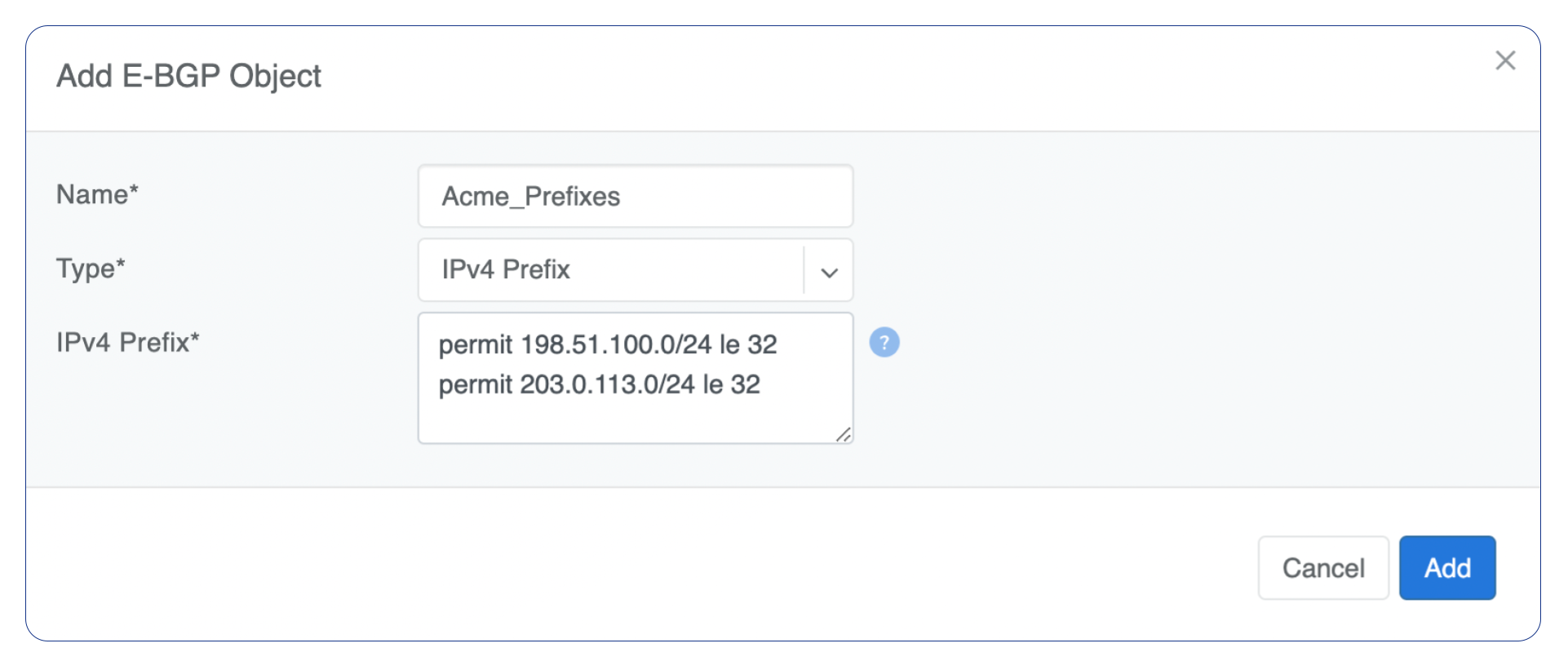
Define rules one per line. Each line in the IPv4 prefix list field consists of three parts:
Action - Possible values are: permit or deny (mandatory).
IP Prefix - Any valid IPv4 prefix (mandatory).
Length - Possible values are: le <len>, ge <len>, or ge <len> le <len>.
Example: Creating an IPv4 Prefix list.
IPv6 Prefix
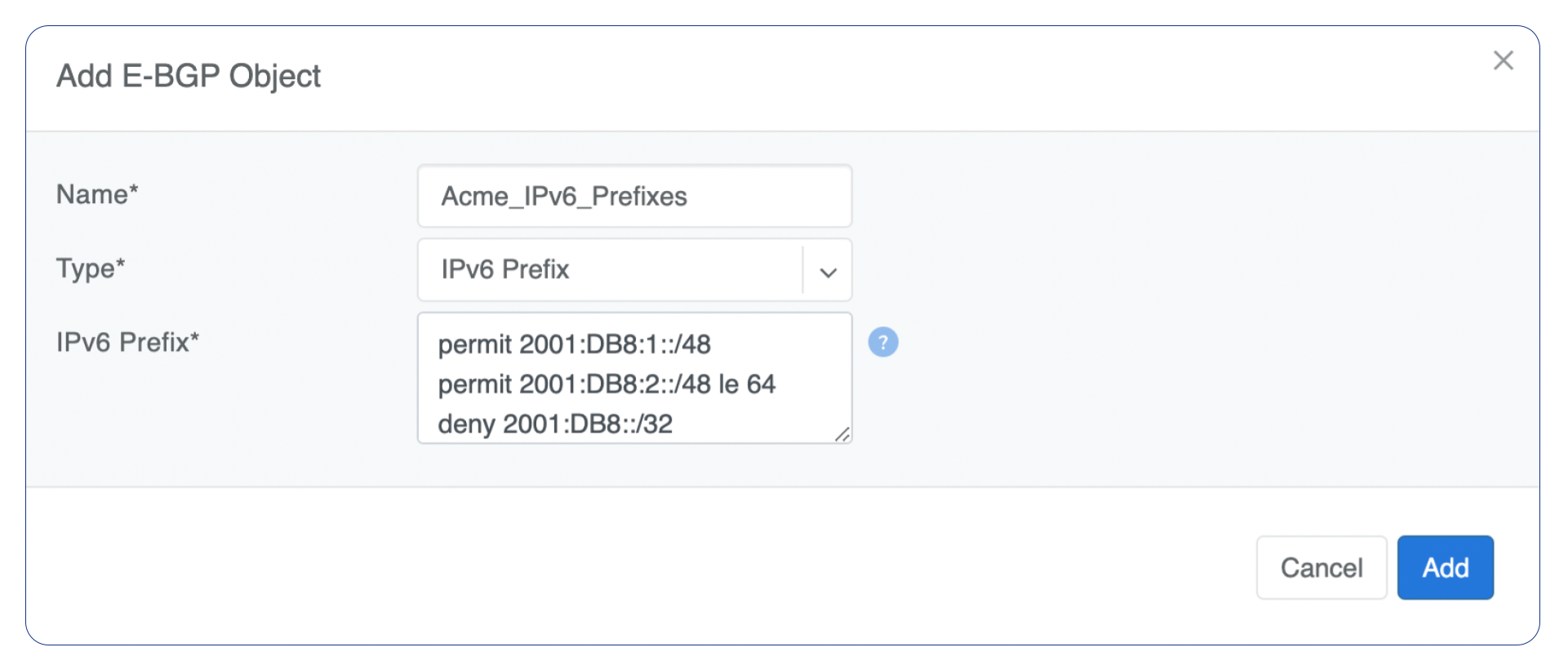
Define rules one per line. Each line in the IPv6 prefix list field consists of three parts:
Action - Possible values are: permit or deny (mandatory).
IP Prefix - Any valid IPv6 prefix (mandatory).
Keyword - Possible values are: le <len>, ge <len>, or ge <len> le <len>.
Example: Creating an IPv6 Prefix list.
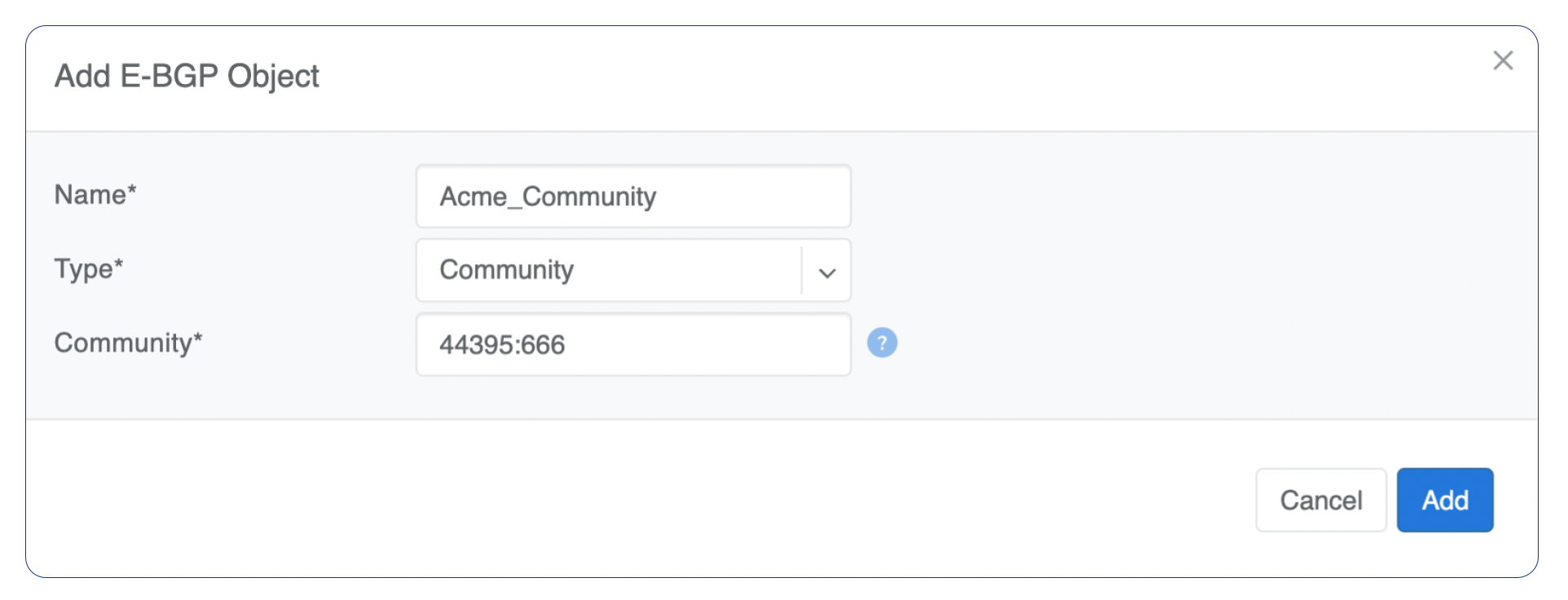
Community
Community field has two parts:
Action - Possible values: permit or deny (mandatory).
Community string - Allowed format:
<permit/deny> LINE. LINE is an AA:NN Community number in AA:NN format (where AA and NN are (0-65535)) orlocal-AS,no-advertise,no-export,internet, oradditive.
Example: Creating a community.
BGP route-maps
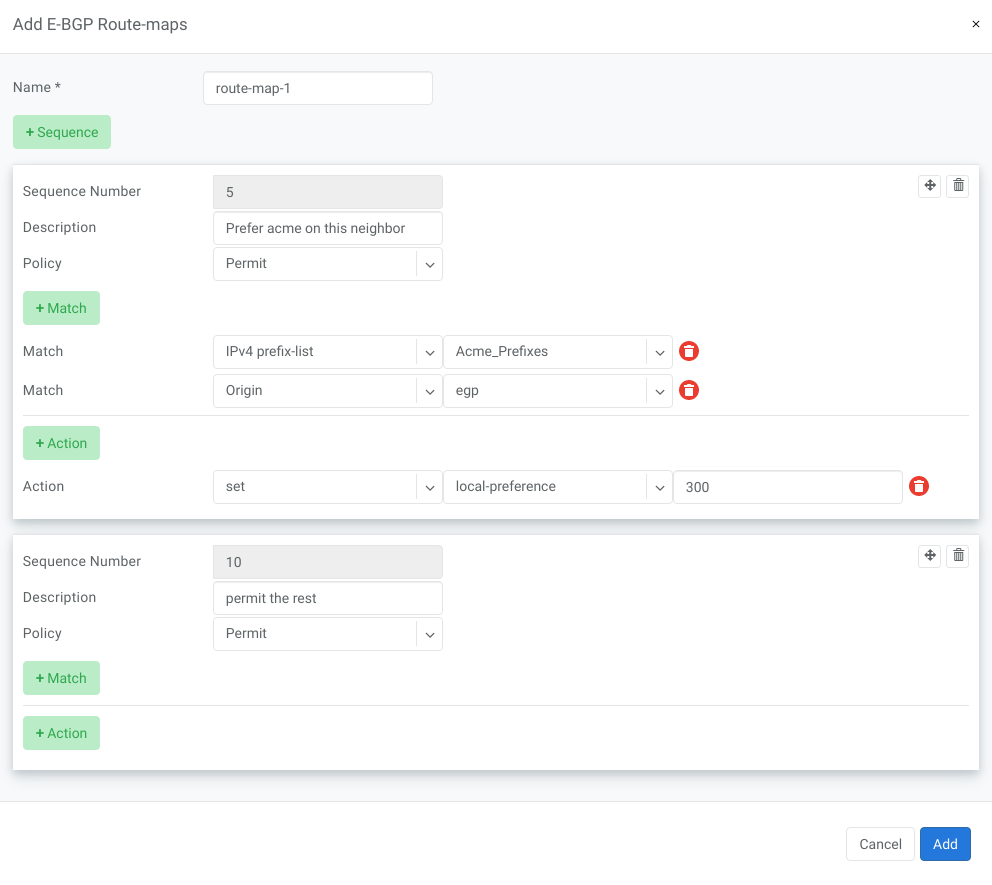
Under Network → E-BGP Route-maps, you can define route-map policies and associate them with BGP neighbors inbound or outbound.
Description of route-map fields:
Sequence Number - Automatically assigned. Drag and move sequences to organize the order.
Description - Free description.
Policy - Permit or deny the routes which match below all match clauses within the current sequence.
Match - Rules for route matching.
Type - Type of the object to match: AS-Path, Community, Extended Community, Large Community, IPv4 prefix-list, IPv4 next-hop, Route Source, IPv6 prefix-list, IPv6 next-hop, local-preference, MED, Origin, Route Tag.
Object - Select an object from the list.
Action - Action when all match clauses are met.
Action type - Define whether to manipulate a particular BGP attribute or go to another sequence.
Attribute - The attribute to be manipulated.
Value - New attribute value.
Example: route-map
eBGP Importing Non-Default Routes into a VPC
In multi-uplink deployments, SoftGate Hyperscale (SG-HS) nodes can be eBGP peered with different upstream networks.
By default, Netris SoftGates only redistribute the default route into tenant VPCs, regardless of what other prefixes they receive from upstream peers. This ensures a consistent routing table across all SoftGates, but can lead to suboptimal routing, where traffic from the VPC is always routed to the SoftGate receiving the default, even if another SoftGate has a better path via specific prefixes.
Starting with version 4.5.4, Netris introduces a mechanism to selectively import non-default routes into VPCs by tagging them with a special BGP community: 0:7. Routes marked with this community will be redistributed into tenant VPCs alongside the default.
Warning
Importing additional prefixes into VPCs increases the routing table size on SoftGates and switches. Ensure that your hardware can handle the increased load, especially if you plan to import many prefixes.
How to Import Non-Default Prefixes
You have two options for tagging the desired prefixes with the required 0:7 community.
Option 1: Tag Inbound in Netris (on SoftGate HS)
If you manage the eBGP peer configuration using the Netris Controller, you can mark specific routes for redistribution into tenant VPCs by tagging them with the special BGP community 0:7.
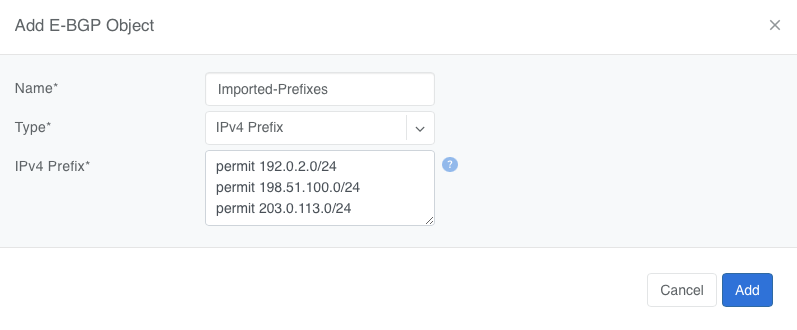
Create a Prefix List under Network → E-BGP Objects
Tip
Do not include 0.0.0.0/0 — it is automatically imported.
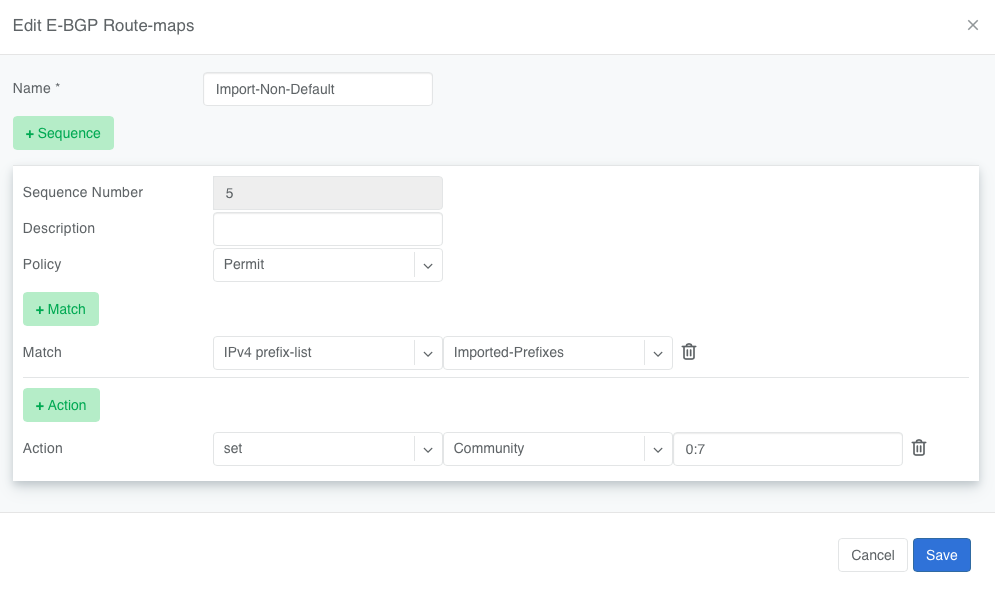
Create a Route Map under Network → E-BGP Route-Maps
Add a new route-map that
Matches the prefix list created in Step 1
Sets the BGP community to
0:7
Attach the Route Map to the eBGP Peer under Network → E-BGP
Edit the relevant eBGP neighbor and, under Advanced Settings, set the inbound route-map to the one created in Step 2
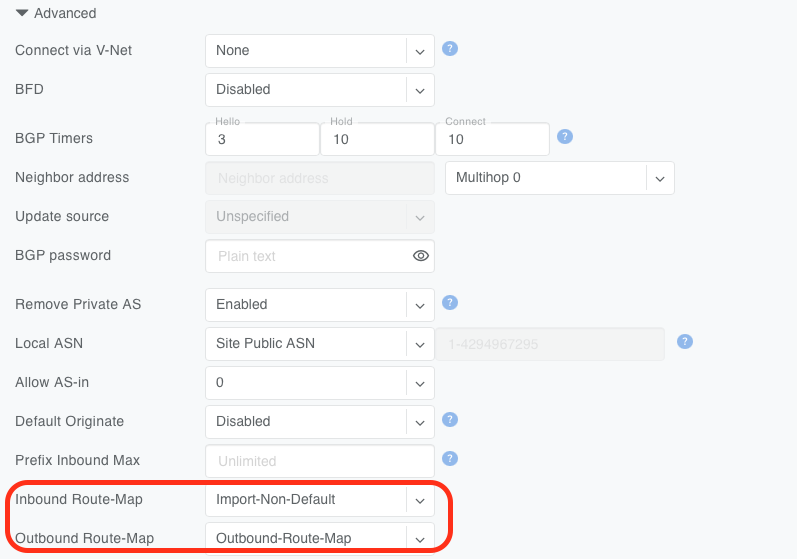
Once applied, any matching prefixes received from this eBGP peer will be tagged with community 0:7, making them eligible for redistribution into tenant VPCs by the SoftGate.
Tip
You can verify imported routes in the Looking Glass (Network → Looking Glass) section of the Controller UI.
Warning
When configuring an inbound route-map on an eBGP peer, an outbound route-map must also be set. If no outbound route-map is needed, create a dummy one that permits all routes without modification and attach it to the outbound direction.
Option 2: Tag Outbound from External BGP Peer
Alternatively, the external BGP speaker can set the 0:7 community on outbound updates before advertising routes to the SoftGate. This option requires no configuration in Netris, as long as the incoming route already carries the community.
This is useful when the upstream router is under the customer’s control, and the customer prefers to manage policy on that side.