
 Join Slack
NAT
Overview
If you utilize private address space for your hosts, you may need a NAT service to enable internet access. Netris SoftGate nodes are required for NAT (Network Address Translation) functionality to work and support SNAT and DNAT features.
Note
NAT’s global IP (a translated public address) is a different concept from an IPAM subnet’s Global Routing checkbox (advertising a subnet as-is, untranslated, outside its own VPC). See Global Routing on the IPAM page if that’s what you’re looking for.
Enabling NAT
To enable NAT for a given site, you first need to create a subnet with NAT purpose (see the Create subnets for NAT service section on the IPAM page). The NAT IP addresses can be used for SNAT or DNAT as a global IP address (the public IP visible on the Internet). NAT IP pools are IP address ranges that SNAT can use as a rolling global IP (for a larger scale, similar to carrier-grade SNAT). SNAT is always overloading the ports, so many local hosts can share one or just a few public IP addresses. You can add as many NAT IP addresses and NAT pools as you need. Adding an IP Subnet under Network → IPAM.
Defining NAT rules
NAT rules are defined under Network → NAT.
Example: SNAT all hosts on 10.0.1.0/24 subnet to the Internet using 192.0.2.128 as a global IP.
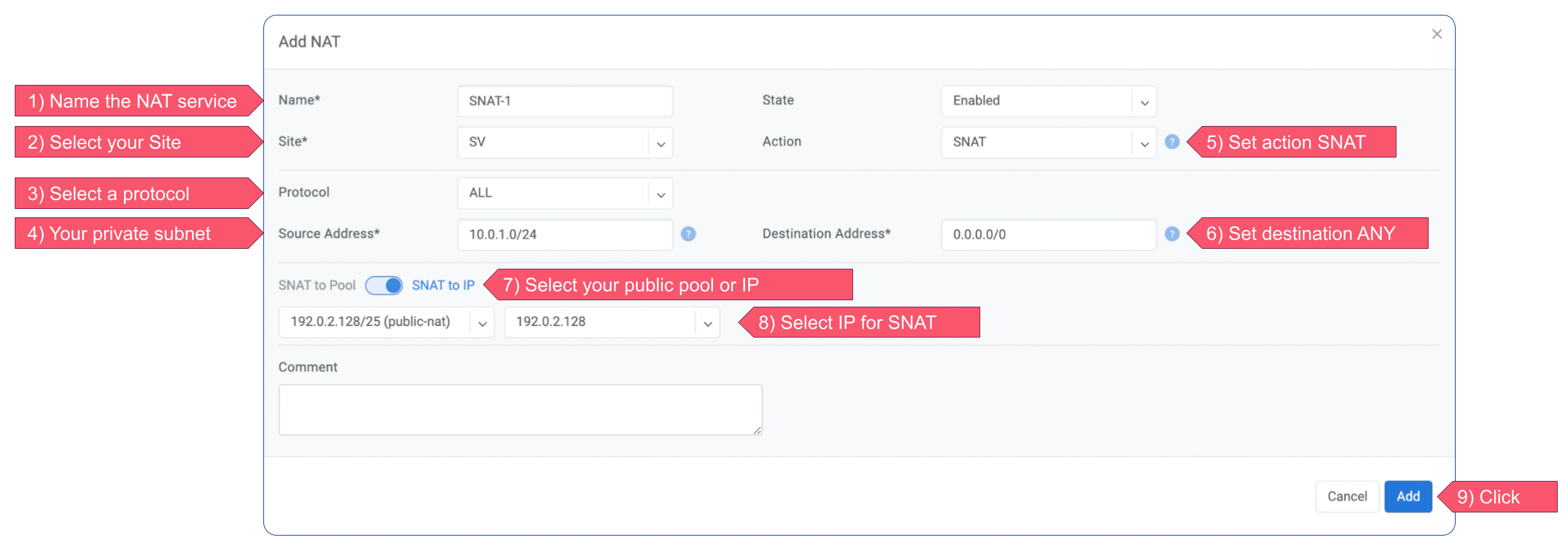
Figure: SNAT rule example
Example: Port forwarding. DNAT the traffic destined to 192.0.2.130:8080 to be forwarded to the host 10.0.1.100 on port tcp/80.
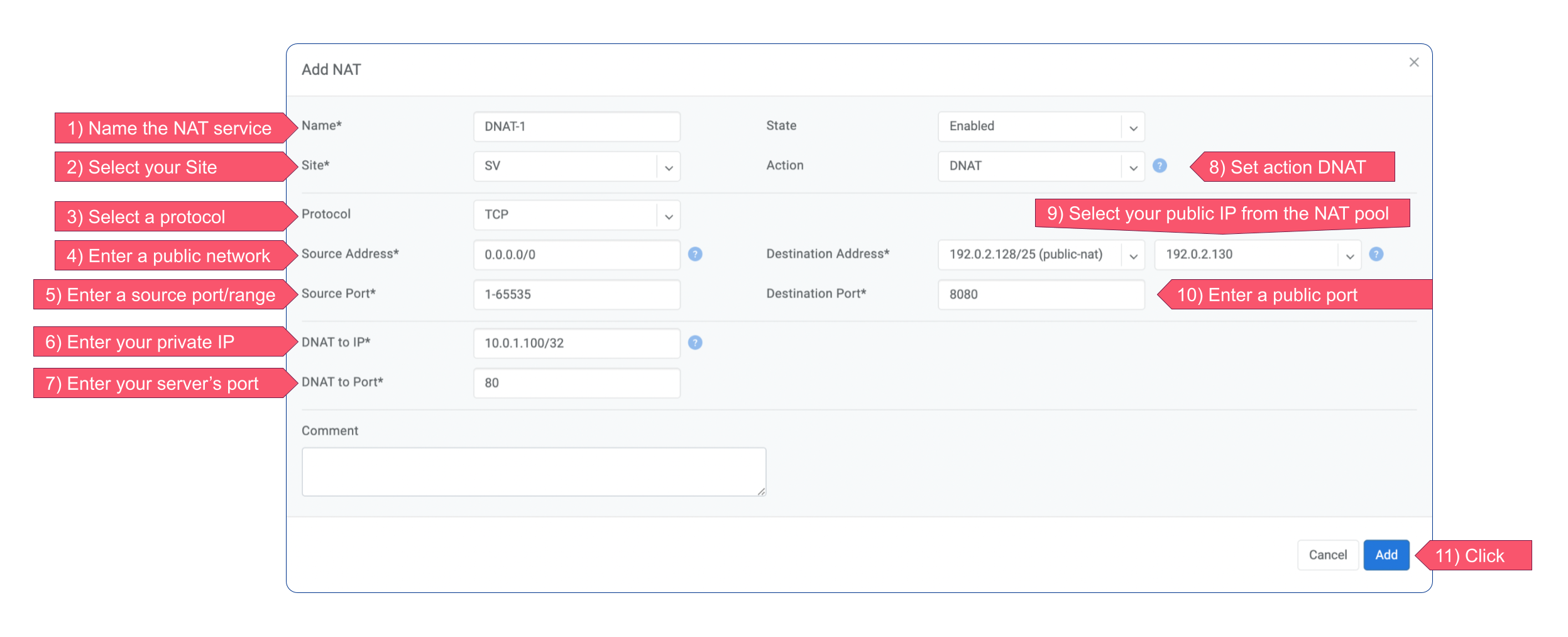
Figure: DNAT port forwarding example
Field |
Description |
|---|---|
Name |
Unique name. |
State |
State of rule (enabled or disabled). |
Site |
Site to apply the rule. |
Action |
SNAT - Replace the source IP address with specified NAT IP along with port overloading. DNAT - Replace the destination IP address and/or destination port with specified NAT IP. ACCEPT - Silently forward, typically used to add an exclusion to broader SNAT or DNAT rule. |
Protocol |
All - Match any IP protocol. TCP - Match TCP traffic and ports. UDP - Match UDP traffic and ports. ICMP - Match ICMP traffic. |
Source |
Address - Source IP address to match. Port - Source ports range to match with this value (TCP/UDP). |
Destination |
Address - Destination IP address to match. In the case of DNAT it should be one of the predefined NAT IP addresses. Port - For DNAT only, to match a single destination port. Ports - For SNAT/ACCEPT only. Destination ports range to match with this value (TCP/UDP). |
DNAT to IP |
The global IP address for SNAT to be visible on the Public Internet. The internal IP address for DNAT to replace the original destination address with. |
DNAT to Port |
The Port to which destination Port of the packet should be NAT’d. |
Status |
Administrative state (enable/disable). |
Comment |
Free optional comment. |
NAT and ACLs
When a Site’s ACL Default Policy is Deny, inbound traffic to a DNAT rule needs an ACL entry permitting it. Write that entry in the tenant’s VPC against the internal address the traffic is translated to — not against the NAT global IP. See ACL entries for DNAT and L4LB traffic on the Access Control Lists (ACL) page.